
Tapis Overview#
What is Tapis?
In the previous chapters, you learned how jobs actually run on TACC systems: how SLURM schedules work, how resources are requested, how queues behave, and what happens on compute nodes once a job starts. Tapis is the layer that automates all of that complexity for you.
Tapis is a network-based platform that provides a consistent and secure way to submit, monitor, and manage computational jobs and data across high-performance computing (HPC) and cloud systems. Rather than writing and managing scheduler scripts, staging files by hand, and tracking outputs manually, you describe what you want to run — and Tapis handles how and where it runs.
In practical terms, Tapis sits between your working environment (for example, Jupyter notebooks, Python scripts, or the DesignSafe portal) and the execution systems at Texas Advanced Computing Center (TACC). It translates high-level job requests into the low-level scheduler actions you just learned about, then tracks the full lifecycle of each job:
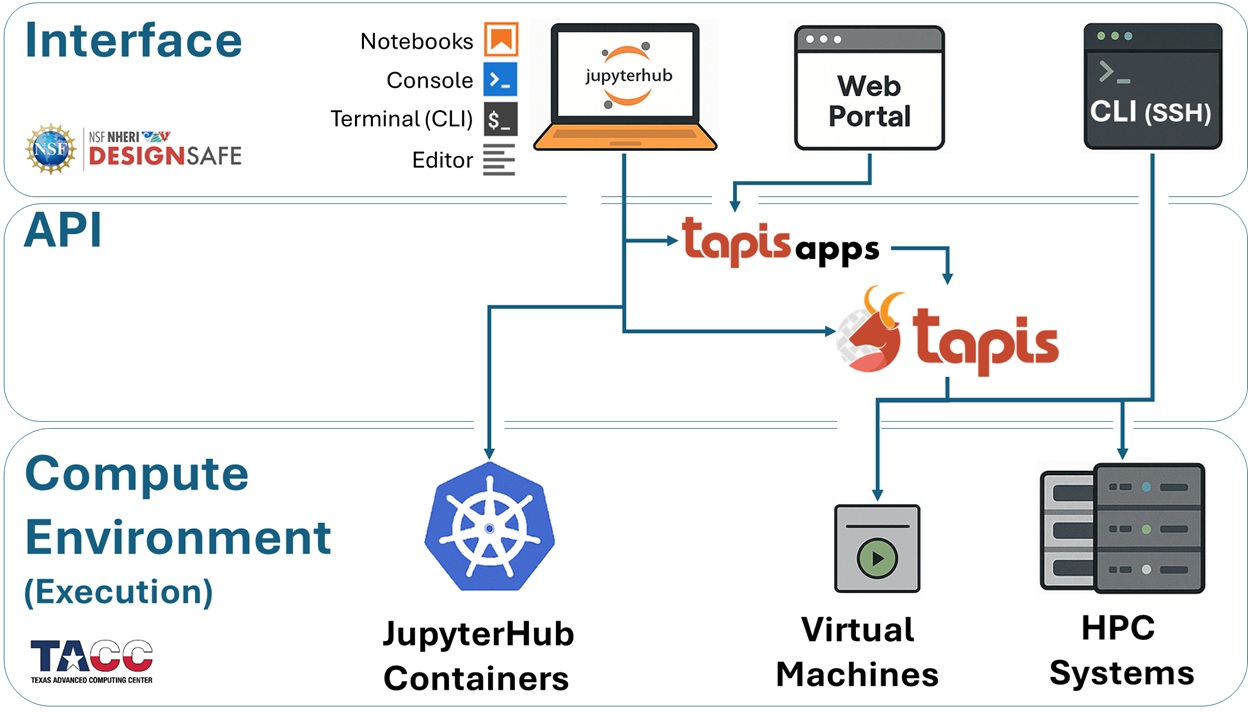
Tapis Jobs: From SLURM Scripts to Automated Execution#
A Tapis Job represents one execution of a registered Tapis App, including:
Input files and parameters
Resource requests (nodes, cores, walltime, queues)
Execution and archiving instructions
When you submit a job through Tapis, you are effectively saying:
“Run this application with these inputs and resource requirements on that system.”
Behind the scenes, Tapis:
Stages your input data on the execution system
Generates and submits the appropriate scheduler job
Monitors job state and execution progress
Collects logs, exit codes, and output files
Archives results and metadata for later use
From the user’s perspective, this replaces dozens of manual steps with a single, repeatable job submission.
How Tapis Fits into the DesignSafe Workflow#
Within DesignSafe, Tapis is the service that connects your analysis to TACC’s compute resources. Whether you submit a job from the web portal or from a Python notebook using Tapipy, the same Tapis services handle execution, monitoring, and data management.
This separation of concerns is intentional:
You focus on your analysis
Tapis handles execution logistics
TACC systems provide the compute power
Why Use Tapis?#
Tapis provides:
Automation of SLURM-based workflows, without requiring you to manage job scripts directly
Seamless access to powerful HPC systems at TACC through DesignSafe
End-to-end tracking of inputs, parameters, execution details, and outputs
Reproducibility, by preserving job metadata and app versions
Collaboration and sharing, with controlled access to apps, jobs, and data
No infrastructure to maintain — Tapis is hosted and operated for you
What Can Tapis Do?#
Beyond job submission, Tapis supports:
File management on Tapis-enabled systems
Job monitoring, including status, logs, and exit codes
Job metadata queries for provenance and reproducibility
App-based execution, enabling standardized and versioned analyses
All of these capabilities are accessible programmatically, and in this document we will focus primarily on Python-based workflows using Tapipy, building on the computational environments you have already seen.
The Tapis Workflow at a Glance#
Most DesignSafe applications powered by Tapis follow this pattern:
Authenticate with Tapis
Stage input files (if needed)
Submit a job using a registered Tapis App
Monitor job status (pending → running → finished)
Access archived outputs for post-processing or downstream analyses