dapi.workflows chains Tapis jobs. You define each stage as a normal job and declare which stage needs the results of which; run() hands the graph to DesignSafe’s workflow service, which submits every job on your behalf the moment the jobs it depends on finish. In the example on this page, a 48-core sweep runs first, and the one-core training job that reads its results is submitted automatically when the sweep completes. Stages that do not depend on each other run at the same time, and closing your notebook does not stop the run. Every job is a real Tapis job, on the same queues and against the same allocation as a job you submit by hand.
The concepts behind the design, and an interactive view of the scheduler, live in the DesignSafe Workflows book.
Step 1. Generate the job requests
Every workflow node is an ordinary job request from ds.jobs.generate(). Define each stage exactly as if it were a standalone job, sized to its own resources; the 48-core sweep and the 1-core trainer below are the OpenSees ML example’s two stages.
from dapi import DSClient

ds = DSClient()

sweep_job = ds.jobs.generate(
    app_id="python-s3",
    input_dir_uri=staged_uri,
    script_filename="call_pylauncher.py",
    node_count=1,
    cores_per_node=48,
    max_minutes=30,
    queue="skx-dev",
    allocation=allocation,
)
train_job = ds.jobs.generate(
    app_id="python-s3",
    input_dir_uri="tapis://designsafe.storage.default/placeholder",  # replaced in Step 3
    script_filename="ml_post.sh",
    node_count=1,
    cores_per_node=1,
    max_minutes=15,
    queue="skx-dev",
    allocation=allocation,
    extra_env_vars=[{"key": "BINARY", "value": "bash"}],
)
Step 2. Add the tasks to a workflow
You declare every dependency yourself; dapi never infers one from the order you add tasks.
from dapi.workflows import Workflow, JobTask

wf = Workflow("opensees-ml")
sweep = wf.add(JobTask("sweep", job_dict=sweep_job))
train = wf.add(JobTask("train", job_dict=train_job), depends_on=["sweep"])
Step 3. Wire outputs between tasks
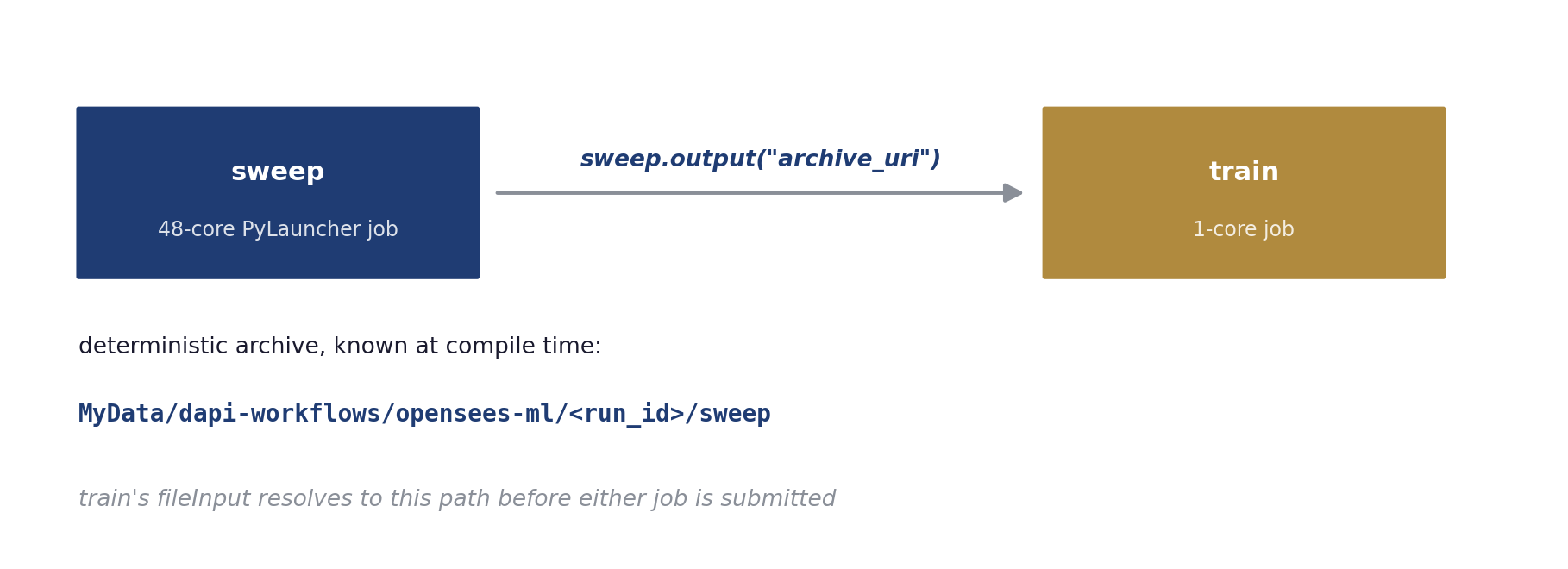
A task references an upstream task’s archive with task.output(). The reference does two things at once. dapi fills the train job’s sourceUrl with the sweep’s archive path, and it makes the train job wait for the sweep to finish, so the explicit depends_on above becomes optional.
train_job["fileInputs"][0]["sourceUrl"] = sweep.output(
    "archive_uri", suffix="/inputDirectory"
)
train = wf.add(JobTask("train", job_dict=train_job))
dapi replaces the reference with a real path before it submits anything. Each run gives every task a fixed archive directory, MyData/dapi-workflows/<workflow>/<run_id>/<task>, so the sweep’s archive location is known before the sweep ever runs, and the train job’s sourceUrl is a concrete tapis:// path from the start. The suffix selects a subfolder of the upstream archive, for example the inputDirectory a python-s3 job archives its results into.
Only archive_uri can be referenced. A job’s UUID or status does not exist before the run, so referencing them raises a validation error.
Step 4. Validate, visualize, preview
validate() rejects cycles, duplicate task ids, and references to unknown tasks. visualize() draws the graph with every edge labeled by the output flowing across it, so a wiring mistake is visible before it costs a queue wait.
wf.validate()
wf.visualize()
compile() shows exactly what a run will submit, one job definition per task with archives assigned and references resolved.
tasks, archives = wf.compile(ds.tapis.username, run_id="preview")
print(tasks[1]["tapis_job_def"]["fileInputs"][0]["sourceUrl"])
# tapis://designsafe.storage.default/<you>/dapi-workflows/opensees-ml/preview/sweep/inputDirectory
Step 5. Run and watch
results = wf.run(ds)While the run is active, run() streams timestamped status transitions for every task, so a notebook shows each node advance from submission through completion.
[18:12:10] pipeline 'opensees-ml-20260810-181209': submitted (2 tasks)
[18:12:41]   task sweep: created -> active
[18:12:41]   task train: created -> pending
[18:19:19]   task sweep: active -> completed
[18:19:19]   task train: pending -> active
[18:33:05] task train: active -> completed| Parameter | Default | Meaning |
|---|---|---|
run_id | timestamp | Names this run’s archive tree; pass one explicitly when a task needs the run root before run() |
poll_interval | 30 | Seconds between status polls |
timeout_minutes | 240 | Stop waiting after this long; the pipeline itself keeps running server-side |
progress | True | Stream per-task transitions |
Step 6. Collect results
run() returns a mapping from task id to status, message, and archive_uri. Every task’s outputs sit at its deterministic archive path.
ds.files.download(
    results["train"]["archive_uri"] + "/inputDirectory/ml_results/report.txt",
    "report.txt",
)
Failure semantics
The service never submits a task whose upstream failed, and the WorkflowExecutionError that run() raises lists each task’s state. A failed branch never cancels its siblings; independent branches run to completion, and their archives survive for a fixed rerun. Closing the notebook changes nothing; the service keeps executing the pipeline, and interrupting run() only stops the progress stream.
Parallel branches and fan-in
The service submits tasks with no edges between them at the same time, each as its own job with its own resources. A downstream task that depends on all of them becomes the fan-in.
wf = Workflow("regional-study")
a = wf.add(JobTask("shard-a", job_a))  # no edges between these three:
b = wf.add(JobTask("shard-b", job_b))  # all submitted at once
c = wf.add(JobTask("shard-c", job_c))
wf.add(JobTask("aggregate", agg_job), depends_on=["shard-a", "shard-b", "shard-c"])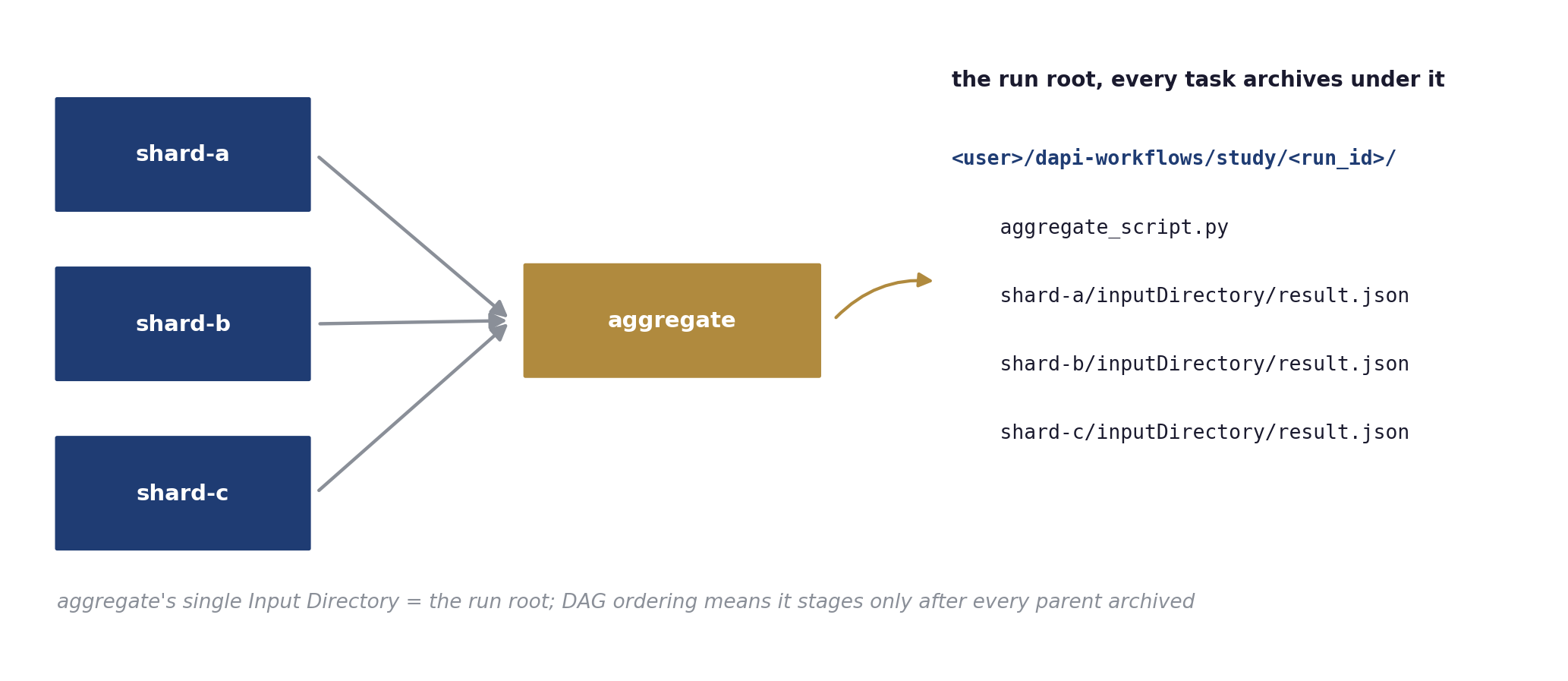
Most DesignSafe apps, python-s3 included, accept exactly one input directory (strictFileInputs), yet a fan-in needs every parent’s output. All tasks of a run archive under one run root, so the aggregator’s single input directory is the run root itself, and because run() submits the aggregator only after every parent has archived, Tapis stages that directory with every shard’s results already in it. The app never changes. This is the run-root pattern. Choose the run_id yourself so the run root is known up front, and upload the aggregator’s script into it before running.
run_id = time.strftime("%Y%m%d-%H%M%S")
run_root = f"tapis://designsafe.storage.default/{ds.tapis.username}/dapi-workflows/regional-study/{run_id}"
ds.files.upload("aggregate.py", f"{run_root}/aggregate.py")
agg_job = ds.jobs.generate(app_id="python-s3", input_dir_uri=run_root,
                           script_filename="aggregate.py", ...)
...
results = wf.run(ds, run_id=run_id)
Inside the aggregator, each parent’s outputs sit at <task_id>/inputDirectory/. The pi fan-out notebook runs this exact shape on Stampede3. Three Monte-Carlo shards run in parallel, and the aggregator submits the moment the last shard finishes.
Archive filters
By default a python-s3 task archives its whole working copy, including the staged inputs, and fan-ins re-stage everything their parents archived. Add a Tapis archiveFilter to every workflow node so it archives only its result files.
job["parameterSet"]["archiveFilter"] = {
    "includes": ["metrics.json", "**/metrics.json"],
    "includeLaunchFiles": False,
}
On the pi workflow, the filter cut the aggregator’s archiving from 11.2 minutes to 41 seconds and the whole workflow from 27 to 16 minutes. Staging time did not shrink with volume; Tapis spends roughly the same time staging a directory whatever its size, so budget for that fixed cost when sizing many-node graphs.
Fuse sequential steps into one job
Separate tasks each pay a queue wait. When a linear sequence of steps can share one node, sequence_job() packs the steps into a single python-s3 job that runs them in order and fails at the first failing step. The result is an ordinary job request, so it can also serve as one node inside a larger graph.
from dapi.workflows import sequence_job

fused = sequence_job(
    ds,
    steps=["python3 call_pylauncher.py", "bash ml_post.sh"],
    input_dir_uri=staged_uri,
    node_count=1,
    cores_per_node=48,
    max_minutes=45,
    queue="skx-dev",
    allocation="MyAllocation",
)
job = ds.jobs.submit(fused)
Choose the graph when stages need different resources or fan out; choose the fused job when they share a machine and always run together.
Containers as workflow nodes
Tools that need their own software stack run as containers inside ordinary python-s3 jobs, so they drop into a graph unchanged. Compute nodes pull registry images directly (apptainer exec docker://usgs/gmprocess ...), and you ship an unpublished image as a docker save tarball that Tapis stages like any input file and the driver script converts to SIF on the node. The container-demo example is the working reference, including the driver script and its two sharp edges (load tacc-apptainer with set -u relaxed; recent Docker saves OCI layout, so convert with oci-archive:).
Full example
The OpenSees ML DAG notebook runs a 75-simulation OpenSees sweep and a training job as a two-node workflow on Stampede3.