DesignSafe provides three places where computation happens. Each serves a different purpose, and most researchers move between them as a project evolves: develop interactively in JupyterHub, then submit production runs to HPC.
The environments form a tiered approach that lowers the barrier to HPC, AI, and ML one step at a time.
Portal apps run simulation codes (including SimCenter tools) on HPC without writing any orchestration code.
JupyterHub adds interactive work for small problems plus programmatic HPC job submission with dapi.
JupyterLab HPC brings interactive sessions onto dedicated CPU and GPU nodes, with AI/ML stacks such as CUDA, PyTorch, and TensorFlow.
Command-line access to Stampede3, Frontera, and Lonestar6 remains available for researchers who want to manage SLURM directly.
Tools and data stay co-located at TACC through every tier, so moving up a tier never means moving your files somewhere else.
JupyterHub
JupyterHub is where most day-to-day work happens. Each session gets a dedicated Kubernetes container at TACC with up to 8 CPU cores and 20 GB RAM. Sessions start immediately with no queue wait. The browser-based environment includes notebooks, a terminal, a file manager, and a text editor — all sharing the same filesystem.
Move to HPC when the workload needs more memory, more cores, multi-node parallelism (MPI), or longer runtimes than an interactive session allows.
JupyterLab HPC: interactive sessions on compute nodes
For heavier interactive work, JupyterLab HPC (CPU or GPU) and Jupyter HPC Native sessions run on a dedicated compute node — not a container. The session is scheduled by SLURM like any job, and you get the full node exclusively; GPU sessions run on Vista (NVIDIA H200).
| JupyterHub | JupyterLab HPC | |
|---|---|---|
| Environment | Dedicated container on a shared node | Dedicated Stampede3 compute node |
| Startup | Immediate | SLURM queue (skx-dev starts fastest, 2 h max) |
| Resources | 8 cores, 20 GB RAM | Full node — cores and memory depend on node type |
| Max runtime | No hard limit | 48 hours (SLURM-enforced) |
| Storage visibility | DesignSafe mounts (MyData, Work, ...) | Stampede3 filesystems: $HOME, $WORK, $SCRATCH |
| Custom environments | Reinstall each session unless kept in $HOME | Persist in the Stampede3 $HOME |
| Allocation | Not required | Required — the full node is charged in SUs |
Use JupyterHub for development and as the launchpad for batch jobs. Use JupyterLab HPC to debug at full-node scale, inspect job outputs directly on $SCRATCH (which JupyterHub cannot see), or run interactive workloads a container can’t hold.
Which Jupyter should I pick?
Why move up, measured
The payoff of picking the right tier is not marginal. The same 10,000-simulation fragility study runs in about 2 hours in a JupyterHub session and about 3 minutes on a dedicated Stampede3 node. Drag the study size to see when the queue wait stops mattering.
The measured JupyterHub-versus-HPC scaling for a Monte Carlo fragility study (Rincon and Padgett, 2024).
CPU vs GPU
A CPU spends most of its silicon on control logic and cache serving a few powerful cores, which makes it good at general-purpose, branch-heavy work. A GPU spends nearly all of its silicon on thousands of small cores doing the same arithmetic in lockstep, which makes it dramatically faster for dense linear algebra, and that is exactly what ML training and many physics kernels are.
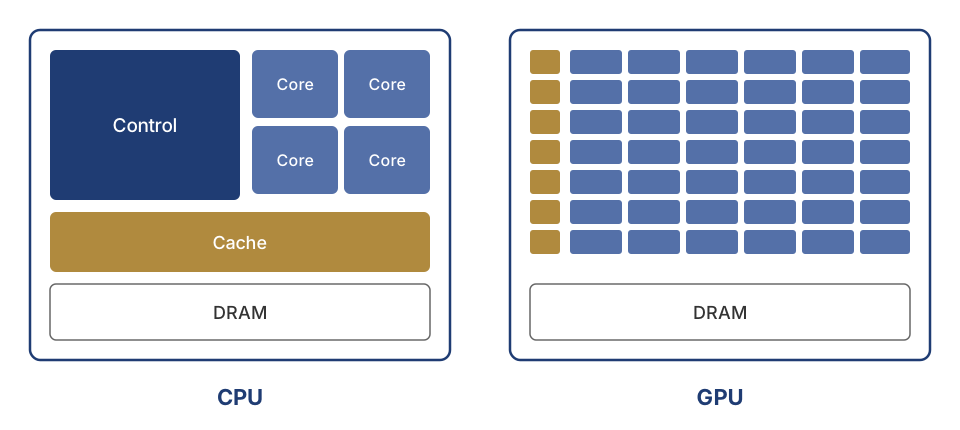
A CPU offers a few powerful cores with large caches. A GPU offers thousands of simple cores that excel at uniform, data-parallel arithmetic.
On DesignSafe, GPU work runs through JupyterLab HPC GPU sessions (dedicated GPU node, CUDA, PyTorch, TensorFlow preloaded) or through GPU queues in batch jobs. If the workload is dominated by matrix multiplication, request a GPU; if it is dominated by conditional logic, file handling, or a legacy solver, more CPU cores serve better.
Virtual machines
Virtual machines (VMs) run applications without a queue wait. MATLAB, ADCIRC Interactive, STKO, and QGIS run on shared VMs at TACC; STKO and QGIS provide a full graphical desktop through NICE DCV, which streams a remote desktop to the browser.
OpenSees Express is a submit-only VM: jobs are sent to it through the portal (Tcl scripts, serial only) or via Tapis — there is no SSH and no interactive use. Its appeal is zero queue wait; the trade-off is that the VM is shared without per-user isolation, so performance varies with other users’ load. Use it for short serial Tcl runs; anything parallel or long belongs on HPC. The legacy OpenSees Interactive VM is being retired in favor of JupyterHub.
VMs share hardware across users, so they work best for lightweight tasks and quick tests.
HPC systems
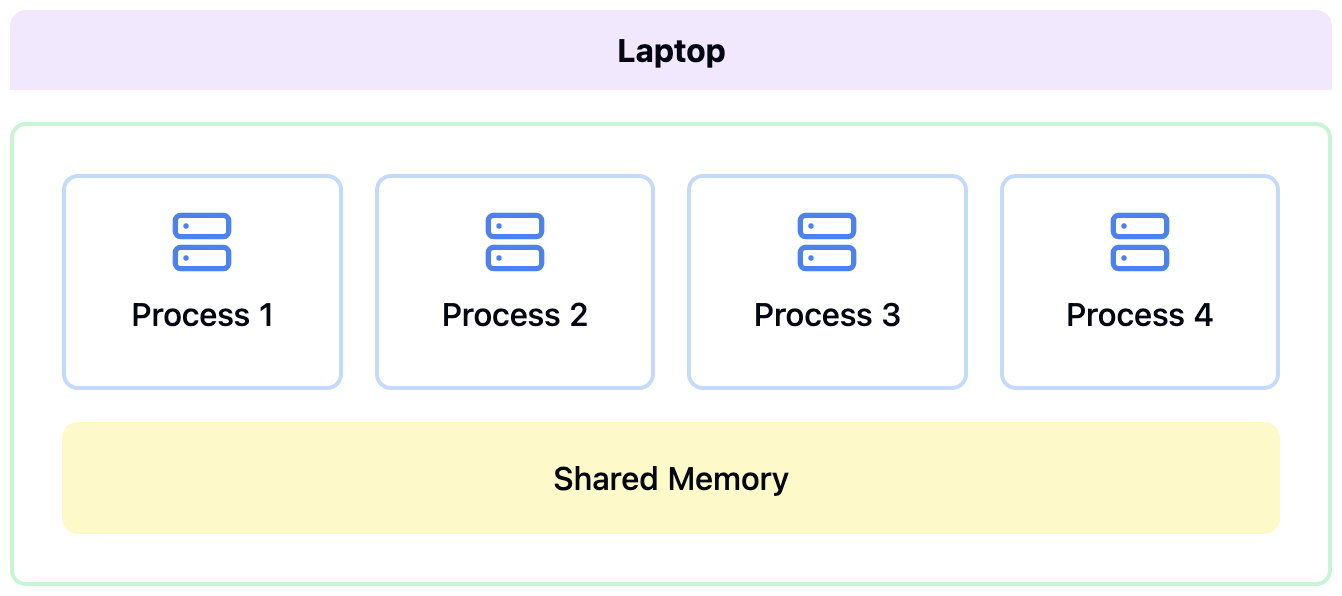
A laptop. Every process shares one memory pool.
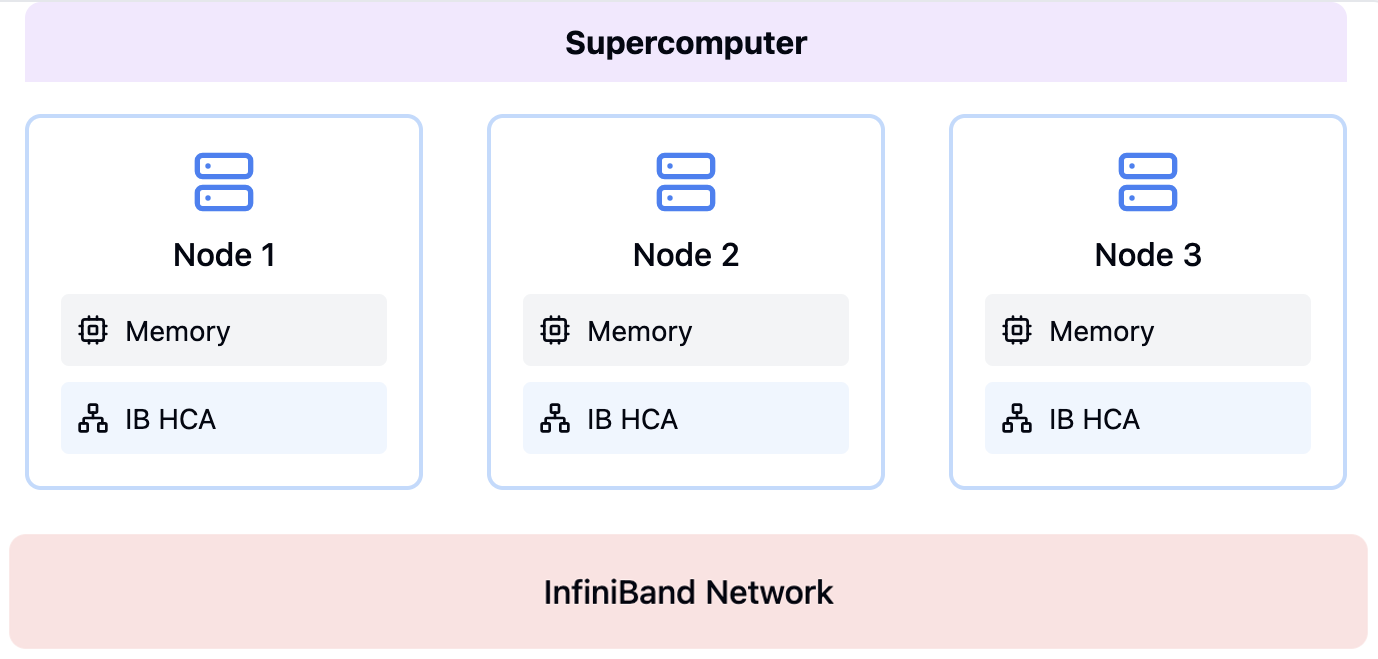
A supercomputer. Each node has its own memory, and nodes communicate over an InfiniBand network.
HPC (High-Performance Computing) systems handle production-scale computation. These are clusters of interconnected machines (nodes), each with dozens of CPU cores and hundreds of gigabytes of memory. They are shared systems — thousands of researchers submit jobs to the same hardware, so SLURM manages access through job queues. Researchers using DesignSafe never interact with SLURM directly; Tapis generates SLURM scripts automatically. Long-running simulations, multi-core parallel analyses, and parametric sweeps with hundreds of runs all belong on HPC.
DesignSafe researchers have access to three TACC systems:
| System | Cores per Node | Memory per Node | Primary Use |
|---|---|---|---|
| Stampede3 | 48–112 (varies by node type) | 128 GB–4 TB | General-purpose, most DesignSafe jobs |
| Frontera | 56 | 192 GB | Large-scale parallel simulations |
| Lonestar6 | 128 | 256 GB | General-purpose, GPU nodes available |
Nodes, cores, and memory
A laptop is a shared-memory machine. Every core sees the same RAM, so parallel programs can simply share data. A supercomputer is a distributed-memory machine, thousands of separate computers connected by a fast network. Cores on the same node still share memory, but cores on different nodes exchange data by passing messages, which is exactly what MPI does. This distinction drives how jobs are sized.
A node is a complete physical computer. Each node has multiple cores (CPUs) that execute work in parallel, sharing the same pool of RAM.
When submitting a job, specify node_count, cores_per_node, and max_minutes. Total cores = node_count x cores_per_node. For MPI jobs, each core runs one parallel process (rank). For PyLauncher sweeps, each core runs one independent task.
All cores on a node share memory. If each process needs more memory, request fewer cores per node:
| Cores per Node (192 GB SKX) | Memory per Core |
|---|---|
| 48 | ~4 GB |
| 24 | ~8 GB |
| 12 | ~16 GB |
SLURM and queues
SLURM is the job scheduler on all TACC systems. When a job is submitted, SLURM places it in a queue (also called a partition). Each queue groups nodes with similar hardware and enforces limits on node count and runtime. Researchers using DesignSafe never write SLURM scripts directly — Tapis generates them automatically from the job parameters.
Stampede3 queues (full policy in the Stampede3 User Guide):
| Queue | Node Type | Cores | Memory | Max Nodes | Max Duration | Charge Rate |
|---|---|---|---|---|---|---|
| skx | SKX (Skylake) | 48 | 192 GB | 256 | 48 hrs | 1 SU |
| skx-dev | SKX (Skylake) | 48 | 192 GB | 16 | 2 hrs | 1 SU |
| icx | ICX (Ice Lake) | 80 | 256 GB | 32 | 48 hrs | 1.5 SUs |
| spr | SPR (Sapphire Rapids) | 112 | 128 GB HBM | 32 | 48 hrs | 2 SUs |
| pvc | PVC (Ponte Vecchio) | 96 | 512 GB | 4 | 48 hrs | 3 SUs |
| nvdimm | NVDIMM (Large Memory) | 80 | 4 TB | 1 | 48 hrs | 4 SUs |
SKX nodes are the most numerous (1,060) and a good default. The skx-dev queue is designed for short test runs with low wait times — but it allows only one running and one queued job per user at a time, so plan test submissions sequentially. Always test there before submitting production jobs.
Queue limits change over time; the tables above are a snapshot, and TACC’s own queue tables (linked per system) are authoritative. The live limits are also one call away in dapi, where ds.tapis.systems.getSystem(systemId="stampede3").batchLogicalQueues lists every queue with its node, core, and runtime caps.
Frontera queues (56 cores, 192 GB per node; Frontera User Guide):
| Queue | Max Nodes | Max Duration | Notes |
|---|---|---|---|
| normal | 512 | 48 hrs | General production |
| development | 40 | 2 hrs | Testing and debugging |
| large | 2048 | 48 hrs | Requires special approval |
Lonestar6 queues (128 cores, 256 GB per node; Lonestar6 User Guide):
| Queue | Max Nodes | Max Duration | Notes |
|---|---|---|---|
| normal | 32 | 48 hrs | General production |
| development | 4 | 2 hrs | Testing and debugging |
| gpu-a100 | 16 | 48 hrs | NVIDIA A100 GPU nodes |
| gpu-a100-dev | 4 | 2 hrs | GPU development |
Choosing a queue
Estimate memory per process. If each MPI rank needs 8 GB and the node has 192 GB, use at most 24 cores per node.
Determine total cores needed. A model decomposed into 96 subdomains needs 96 cores (e.g., 2 nodes x 48 cores).
Pick the queue that fits. Use
skx-devordevelopmentfor testing. Use production queues for real runs.Check system load. Live queue status: Stampede3, Frontera, Lonestar6.
Allocations and Service Units
A DesignSafe account is a TACC account, and computing time comes as a TACC allocation, a grant of Service Units tied to a research project. New users can start with a 500 SU startup allocation, renewable up to 10,000 SUs per year, and larger allocations are available by request; TACC manages both the allocations and the access. The allocation name signals its scope. DS-Corral covers storage and VM resources, DS-Portal-* allocations back the portal apps, and PI-specific DS-* allocations fund individual research groups.
Running jobs charges Service Units (SUs):
SUs = nodes x hours x charge_rateA job on 4 SKX nodes for 2 hours at 1 SU/node-hour costs 8 SUs. The same job on SPR nodes at 2 SUs/node-hour costs 16 SUs. Nodes are billed entirely regardless of how many cores are used. Every job incurs a minimum charge of 15 minutes.
HPC-enabled tools (OpenSeesMP, OpenFOAM, ADCIRC) require an allocation. If you don’t have one, submit a ticket through the DesignSafe help desk. Remaining balance and allocation codes are on the TACC Dashboard.