Every tool on DesignSafe, whether OpenSees, OpenFOAM, ADCIRC, or the general-purpose Python App, is a Tapis application. Understanding what that means is the key to using DesignSafe effectively, and the foundation for building custom tools that are reproducible and shareable.
What is a Tapis App?
A Tapis App is a packaged recipe for running software on TACC hardware. It bundles together everything needed to execute a simulation: which software to run, how to launch it, what inputs it expects, what resources it needs, and where to put the results.
When a researcher clicks “Submit” in the portal or calls ds.jobs.submit() in dapi, Tapis reads the app definition and handles the rest: copying input files to the compute system, generating a SLURM batch script, submitting it to the scheduler, monitoring execution, and archiving the results back to DesignSafe storage.
This separation is what makes the system powerful. The researcher describes what to run. Tapis handles how and where.
How existing apps work
All of the applications available in the DesignSafe portal are Tapis Apps. Each one was built by defining the same set of components described below, then registered with the Tapis API so it appears in the portal catalog.
| App | What it does | Why it is a Tapis App |
|---|---|---|
opensees-mp-s3 | Runs OpenSees-MP on Stampede3 | Defines the OpenSees module, MPI launch command, input/output staging |
openfoam-s3 | Runs OpenFOAM on Stampede3 | Handles case directory staging, decomposePar, parallel reconstruction |
adcirc-s3 | Runs ADCIRC on Stampede3 | Manages mesh inputs, MPI configuration, ensemble setup |
opensees-express | Runs serial OpenSees on a VM | Uses FORK execution (no scheduler) on a dedicated VM |
python-s3 | Runs Python scripts or any executable | User supplies script, optional binary, modules, pip installs, pre/post scripts, and MPI flag |
When a researcher submits an OpenSees job through dapi:
job_request = ds.jobs.generate(
    app_id="opensees-mp-s3",
    input_dir_uri=input_uri,
    script_filename="model.tcl",
    ...
)
ds.jobs.generate() fetches the opensees-mp-s3 app definition from Tapis, fills in the researcher’s inputs and resource requests, and produces a complete job request. The app definition already knows which execution system to use, which modules to load, and how to launch OpenSees with MPI.
From job request to SLURM script
Tapis translates the job request into a SLURM batch script, so every field in the request has a direct scheduler counterpart. From SLURM’s perspective, a Tapis job is indistinguishable from a manually submitted batch job.
| SLURM concept | Tapis job request field |
|---|---|
Queue / partition (-p) | execSystemLogicalQueue |
Nodes (-N) | nodeCount |
Total tasks (-n) | nodeCount x coresPerNode |
Walltime (-t) | maxMinutes |
Allocation (-A) | schedulerOptions entry -A <allocation> |
| stdout / stderr | tapisjob.out / tapisjob.err, archived with the outputs |
| Working directory | Job working directory on the execution system’s $SCRATCH |
How files move through a job
Tapis never runs a job against your original files. It stages a copy, runs on the copy, and archives the results.
Two consequences follow. The working directory is not the original input folder, so a job that edits its inputs edits a copy that disappears with $SCRATCH purges, and reruns always start from the pristine originals. And outputs only survive if they are inside the working directory when the job ends, because that is the folder the archive step copies back.
Inside a Tapis App
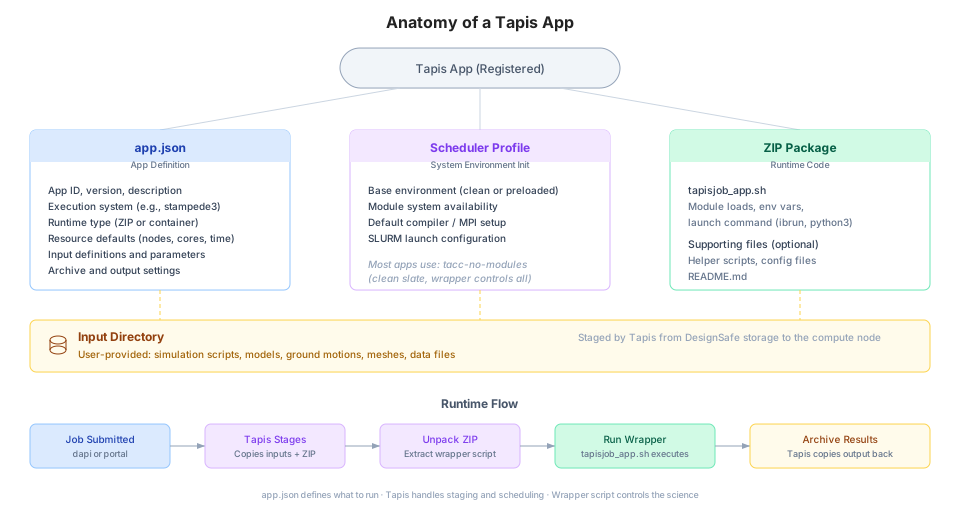
Every Tapis App is built from four components.
1. app.json (the definition)
A JSON file that tells Tapis everything about the app: its name, version, which execution system it runs on, what inputs and parameters it accepts, and what resource defaults to use. This is the contract between the app and Tapis.
{
  "id": "my-opensees-app",
  "version": "1.0.0",
  "description": "Custom OpenSees analysis for bridge fragility",
  "runtime": "ZIP",
  "jobType": "BATCH",
  "jobAttributes": {
    "execSystemId": "stampede3",
    "nodeCount": 1,
    "coresPerNode": 48,
    "maxMinutes": 60,
    "fileInputs": [...],
    "parameterSet": {...}
  }
}
The app.json reference documents every field.
2. Wrapper script (tapisjob_app.sh)
A shell script that contains the actual execution logic: loading software modules, setting environment variables, launching the simulation. This is the part the app developer controls.
#!/bin/bash

# Load the software
module load opensees

# Run the simulation. App arguments arrive as positional parameters.
ibrun OpenSeesMP "$1"
Tapis generates a companion script (tapisjob.sh) that handles SLURM directives, environment setup, and monitoring. The wrapper script is called from within that generated script. This two-script model separates Tapis concerns (scheduling, staging, archiving) from scientific concerns (which software to run and how).
The wrapper scripts reference covers the two-script model, MPI configuration, and deployment patterns.
3. Runtime package
The app’s executable code, delivered to the compute node. For most DesignSafe apps, this is a ZIP file containing the wrapper script and any supporting files. Tapis unpacks it on the compute node before execution. Apps can also use container images (Singularity/Apptainer) for fully reproducible environments.
4. Input directory (user-provided)
The researcher’s files: simulation scripts, model definitions, ground motions, meshes. These are staged separately from the app code and placed in the working directory on the compute node.
Why build a custom app?
The public apps on DesignSafe cover the most common tools and configurations. For many researchers, they are all that is needed. But a custom app makes sense when:
The workflow requires non-standard software, flags, or module versions
The analysis has custom pre-processing or post-processing steps baked into the execution
A research group wants a standardized, reusable template for a specific type of study
The workflow includes automated parameter sweeps, multi-stage pipelines, or conditional logic
Reproducibility is critical: the app definition pins exact software versions, modules, and execution steps
A custom app is not a one-off script. It is a versioned, registered, shareable tool that any collaborator can run with ds.jobs.submit() or through the portal. Two researchers using the same app definition with the same inputs will get the same results on the same hardware. This is the foundation of reproducible computational research on DesignSafe.
Creating a custom app
Building a custom app requires four steps.
Step 1: Write the simulation code
Start with a working script (Python, Tcl, compiled binary) that runs correctly on a TACC system. Test it interactively in JupyterHub or through a small manual job before packaging it as an app.
Step 2: Write the wrapper script
Create tapisjob_app.sh with the module loads and launch commands.
#!/bin/bash

# Load required modules
module load python/3.12.11

# Run the analysis. The first app argument is the script filename.
python3 "$1"
The wrapper should be non-interactive (no prompts), write all output to the current directory, and exit with a meaningful return code (0 for success).
Step 3: Define app.json
Specify the app metadata, execution system, resource defaults, and input/parameter definitions.
{
  "id": "my-research-group-app",
  "version": "1.0.0",
  "description": "Bridge fragility analysis with OpenSeesPy",
  "runtime": "ZIP",
  "jobType": "BATCH",
  "jobAttributes": {
    "execSystemId": "stampede3",
    "execSystemExecDir": "${JobWorkingDir}",
    "execSystemInputDir": "${JobWorkingDir}",
    "execSystemOutputDir": "${JobWorkingDir}",
    "nodeCount": 1,
    "coresPerNode": 48,
    "maxMinutes": 120,
    "fileInputs": [
      {
        "name": "Input Directory",
        "inputMode": "REQUIRED",
        "envKey": "inputDirectory",
        "targetPath": "inputDirectory"
      }
    ],
    "parameterSet": {
      "appArgs": [
        {
          "name": "Input Script",
          "arg": "analysis.py",
          "inputMode": "REQUIRED"
        }
      ],
      "schedulerOptions": [
        {
          "name": "TACC Scheduler Profile",
          "inputMode": "FIXED",
          "arg": "--tapis-profile tacc-no-modules"
        }
      ]
    }
  }
}
Step 4: Register and test
Upload the ZIP package (wrapper script + any supporting files) to DesignSafe storage, then register the app using the Tapis Python client.
import json
from dapi import DSClient

ds = DSClient()   # authenticated Tapis client available as ds.tapis

with open("app.json") as f:
    app_def = json.load(f)

ds.tapis.apps.createAppVersion(**app_def)
Once registered, the app can be used immediately through dapi or the portal.
from dapi import DSClient

ds = DSClient()
input_uri = ds.files.to_uri("/MyData/bridge-study/input/")

job_request = ds.jobs.generate(
    app_id="my-research-group-app",
    input_dir_uri=input_uri,
    script_filename="analysis.py",
    allocation="your_allocation",
)

job = ds.jobs.submit(job_request)
job.monitor()
Building a Custom App takes an app from wrapper to registered version, with complete code, GUI submission, and deployment.
Under the hood, Tapis is a REST API
Everything above rides on a plain REST API. An API is a contract for software to talk to software; a REST API organizes that contract around resources (apps, jobs, files, systems), each addressed by a URL and manipulated with a small set of HTTP verbs.
| Verb | Meaning | Tapis example |
|---|---|---|
| GET | Read a resource | GET /v3/apps lists registered apps |
| POST | Create a resource | POST /v3/jobs/submit submits a job |
| PUT | Replace a resource | PUT /v3/files/{system}/{path} overwrites a file |
| DELETE | Remove a resource | DELETE /v3/files/{system}/{path} deletes a file |
Every layer of tooling speaks this same API, and choosing a layer is choosing how much convenience you want.
DesignSafe-aware defaults, path translation, and job monitoring in one call.
from dapi import DSClient

ds = DSClient()
ds.apps.find("opensees")
The general Tapis Python SDK. More verbose, tenant-agnostic. Available as ds.tapis on an authenticated dapi client.
ds.tapis.apps.getApps(search="opensees")What both SDKs send on the wire.
curl -H "X-Tapis-Token: $JWT" \
  "https://designsafe.tapis.io/v3/apps?search=opensees"
The responses are JSON, so anything that can speak HTTP (a notebook, a CI pipeline, a workflow engine) can drive DesignSafe computation. The rest of this book uses dapi because it folds DesignSafe conventions (path prefixes, app defaults, allocation handling) into the calls, but nothing prevents dropping down a layer when finer control is needed.
Versioning and reproducibility
Every app has an ID and a version (e.g., my-app version 1.0.0). When the app is updated, the version number changes. Old versions remain available, so published research can always point to the exact app version used to produce the results.
Best practices for maintaining apps:
Use semantic versioning (major.minor.patch)
Keep a changelog documenting what changed in each version
Pin module versions in the wrapper script (
module load opensees/3.7.0notmodule load opensees)Test new versions against known results before publishing
Reference
Building a Custom App to author and register your own
app.json schema reference for every field in the app definition
Wrapper scripts reference for the two-script model, MPI patterns, and deployment
Glossary for Tapis and DesignSafe terminology
Tapis documentation for the complete API reference