
Module 6 — Computer Vision at Scale: CLIPSeg-debris#
DesignSafe AI Training


Authors: Kooshan Amini and Jamie E. Padgett (Rice University) · Padgett Research Group. Model: CLIPSeg-debris (Amini, Liu, Padgett, Balakrishnan & Veeraraghavan).
A foundation model on real imagery, not a beam#
Modules 1-5 built models of a cantilever beam: a regression, a surrogate, an explanation, a PDE solver, an operator. Small, tabular, self-contained problems where we always had ground truth to check against.
This module is the other kind of work. A foundation model — CLIPSeg, built on CLIP — fine-tuned to segment hurricane debris in post-event aerial imagery as no / low-density / high-density. Real imagery, a published dataset, a GPU, and a production pipeline that runs on TACC.
What carries over from the earlier modules, and what does not:
Modules 1-5 |
This module |
|
|---|---|---|
Data |
75-1000 simulated cases |
published imagery (PRJ-6029) + live NOAA rasters |
Model |
written from scratch, thousands of parameters |
a pre-trained foundation model, ~150 M parameters |
Training |
seconds to minutes on CPU |
hours on a GH200 GPU |
Ground truth |
a closed-form solution |
hand-labelled masks |
The lesson |
how the method works |
how to run someone else’s model at scale |
The model is not re-implemented here. We load and run the official published repository (PRJ-6225) exactly as distributed — which is itself the point. Most applied ML is not writing architectures; it is getting a published model to run correctly on your data, at scale, reproducibly.
What runs where#
Read this before you start, because half of this notebook needs an allocation.
Part |
What it does |
Needs |
Runs in-session? |
|---|---|---|---|
Setup |
environment, paths, DAPI login, model, weights |
DesignSafe login |
yes |
1 |
official |
GPU session recommended |
yes |
2 |
regional debris map, Estero Island FL, Hurricane Ian |
GPU session recommended |
yes |
3 |
scale the same inference out as an HPC GPU job |
TACC allocation |
submit only |
4 |
fine-tune on Vista (GH200) |
TACC allocation |
submit only |
Parts 1-2 run in a DesignSafe JupyterHub session with no allocation. Parts 3-4 submit real jobs and are shown here from a completed run — read them as the pattern, and run them later against your own allocation.
Session note: in a three-hour session this module is a guided walkthrough rather than hands-on. Every cell’s saved output is committed, so you can follow the story now and run it yourself afterwards.
Useful links#
CLIPSeg-debris software — DesignSafe PRJ-6225 (DOI
10.17603/ds2-yt43-hw55): https://www.designsafe-ci.org/data/browser/public/designsafe.storage.published/PRJ-6225Debris dataset — DesignSafe PRJ-6029: https://www.designsafe-ci.org/data/browser/public/designsafe.storage.published/PRJ-6029
Model weights (Hugging Face): https://huggingface.co/YuhaoL/CLIPSeg-debris
NOAA Emergency Response Imagery — viewer: https://storms.ngs.noaa.gov/ · Hurricane Ian (2022): https://storms.ngs.noaa.gov/storms/ian/index.html#14.4/26.45472/-81.94856 · open data on AWS (
noaa-eri-pds): https://registry.opendata.aws/noaa-eri/dapidocs: https://designsafe-ci.github.io/dapi/ · TACC Vista: https://docs.tacc.utexas.edu/hpc/vista/ · Weights & Biases: https://wandb.ai/Background: CLIPSeg (Lüddecke & Ecker, CVPR 2022) https://arxiv.org/abs/2112.10003 · CLIP (Radford et al., 2021) https://arxiv.org/abs/2103.00020
The long code lives in utils/; the notebook holds the headline calls and the
story.
Environment, paths and imports#
In this step, we:
install any missing Python packages first, so the
utils/imports below succeed on a fresh session (e.g. a new TACC Vista session);anchor a small, reproducible project layout (
utils/,weights/,experiments/);put
utils/on the path and import the demo helpers.
Install dependencies, then restart the kernel#
Installs any missing packages into your environment (to --user). On TACC Vista /
GPU sessions PyTorch is already present; here we add the geospatial + visualization
stack and dapi. The model’s own dependencies (Hydra, Lightning, openai-clip, …)
are installed from the official repo in Step 2.
import os, sys, site, importlib, subprocess

def ensure(pkgs):
    "pip-install (to --user) only the packages that are missing, in one shot."
    missing = []
    for import_name, pip_name in pkgs:
        try:
            importlib.import_module(import_name)
        except ImportError:
            missing.append(pip_name)
    if missing:
        print("installing:", ", ".join(missing), "...")
        subprocess.run([sys.executable, "-m", "pip", "install", "--user", "-q", *missing],
                       check=False)
        # make freshly --user-installed packages importable without a kernel restart
        us = site.getusersitepackages()
        if us not in sys.path:
            sys.path.append(us)
        importlib.invalidate_caches()
    else:
        print("all listed dependencies already present")

ensure([
    ("numpy", "numpy"), ("matplotlib", "matplotlib"),
    ("rasterio", "rasterio"), ("geopandas", "geopandas"), ("pyproj", "pyproj"),
    ("shapely", "shapely"), ("contextily", "contextily"), ("PIL", "pillow"),
    ("tqdm", "tqdm"), ("requests", "requests"), ("cv2", "opencv-python-headless"),
    ("dapi", "dapi"),
])
try:
    import torch
    print("torch", torch.__version__, "| CUDA:", torch.cuda.is_available())
except ImportError:
    print("torch not found — preinstalled on Vista/GPU sessions; "
          "for local inference: pip install torch torchvision")
all listed dependencies already present
torch 2.6.0+cu126 | CUDA: True
Paths resolve from wherever utils/ lives#
Anchor the project root, put utils/ on the path, and import the demo helpers.
from pathlib import Path
import numpy as np
import matplotlib.pyplot as plt
from IPython.display import display

# Make matplotlib figures render inline (some HPC-Native kernels don't set this).
try:
    get_ipython().run_line_magic("matplotlib", "inline")
except Exception:
    pass

NB_DIR = Path.cwd()
REPO_ROOT = NB_DIR if (NB_DIR / "utils").exists() else NB_DIR.parent
sys.path.insert(0, str(REPO_ROOT))

WEIGHTS_DIR = REPO_ROOT / "weights"; WEIGHTS_DIR.mkdir(exist_ok=True)
EXPERIMENTS = REPO_ROOT / "experiments"; EXPERIMENTS.mkdir(exist_ok=True)

from utils import debris_common as dc
from utils import clipseg_official as co
from utils import regional, viz
from utils import dapi_helpers as dh

print("project root :", REPO_ROOT)
print("on DesignSafe:", dh.on_designsafe())
project root : /data/designsafe/mydata/kooshan1/nheri-training-ai-test/workshop_codes
on DesignSafe: True
Connect to DesignSafe with DAPI#
dapi is the DesignSafe API. We use it
throughout to access published data, move files, and submit/monitor HPC
jobs.
In this step, we:
create an authenticated client with
DSClient()(prompts for your DesignSafe username and password);peek at the apps and GPU systems we will use later (Parts 3–4).
If dapi is unavailable (e.g. running off-DesignSafe), the in-session examples
still work — DAPI is used for data access and HPC jobs.
ds = None
try:
    ds = dh.connect()
    try:
        apps = ds.apps.find("agnostic", verbose=False) or []
        print("agnostic app(s):", [getattr(a, "id", a) for a in apps][:5])
    except Exception as e:
        print("apps.find note:", e)
    print("GPU systems on DesignSafe: 'ls6' (NVIDIA A100) and 'vista' (NVIDIA GH200).")
except Exception as e:
    print("DAPI not available here ->", e)
    print("That's OK: the in-session examples below still run.")
Authentication successful.
DatabaseAccessor initialized. Connections will be created on first access.
TMS credentials ready: frontera, stampede3, ls6
[dapi] connected to DesignSafe.
agnostic app(s): ['designsafe-agnostic-app', 'demo-agnostic-app', 'agnostic-app']
GPU systems on DesignSafe: 'ls6' (NVIDIA A100) and 'vista' (NVIDIA GH200).
Every setting you may need to change, in one cell#
GPU systems and queues use sensible DesignSafe defaults. Two inputs are optional and only matter for the HPC parts:
TACC allocation (Parts 3–4) — the project your GPU jobs charge to. Enter yours to run Parts 3–4, or leave it blank to skip them (Parts 1–2 run without it).
W&B API key (Part 4) — enables the live training dashboard on Weights & Biases (experiment tracking). Enter it here, or run
wandb loginbeforehand; leave it blank to track training via DAPI instead. No W&B account is required to run the demo.
Both are read at masked prompts and kept in memory only.
import getpass

# --- GPU systems / queues (DesignSafe defaults; rarely need changing) ---
os.environ.setdefault("INFER_SYSTEM", "vista")     # Part 3 inference system
os.environ.setdefault("INFER_QUEUE",  "gh-dev")    # gh-dev: fast scheduling, 2 h cap (gh = 48 h)
os.environ.setdefault("VISTA_SYSTEM", "vista")     # Part 4 training system (GH200)
os.environ.setdefault("VISTA_QUEUE",  "gh-dev")
os.environ.setdefault("WANDB_PROJECT", "clipseg-debris-finetune")  # your W&B project name
os.environ.setdefault("FT_LIMIT", "120")           # debris-positive images for the demo fine-tune
os.environ.setdefault("WANDB_DISABLE_CODE", "true")                # don't upload notebook source to W&B
os.environ.setdefault("WANDB_NOTEBOOK_NAME", "clipseg-debris-designsafe")  # quiets a benign W&B notice

# --- (Optional) TACC allocation for Parts 3 & 4 ---
_alloc = input("TACC allocation for Parts 3-4 [blank = skip the HPC parts]: ").strip()
ALLOCATION = "" if _alloc.lower() in ("", "none", "no", "skip", "n/a") else _alloc
os.environ["TACC_ALLOCATION"] = ALLOCATION

# --- (Optional) Weights & Biases for the Part 4 training dashboard ---
def wandb_ready():
    if os.environ.get("WANDB_API_KEY"):
        return True
    nrc = Path.home() / ".netrc"
    try:
        return nrc.exists() and "api.wandb.ai" in nrc.read_text()
    except Exception:
        return False

if not wandb_ready():
    _key = getpass.getpass("W&B API key [blank = track training via DAPI only]: ").strip()
    if _key and _key.lower() not in ("none", "no", "skip"):
        os.environ["WANDB_API_KEY"] = _key
        try:
            import wandb
            wandb.login(key=_key, relogin=True)      # also writes ~/.netrc for the Vista job
        except Exception as e:
            print("(could not persist ~/.netrc via wandb.login:", e, ")")

USE_WANDB = wandb_ready()
os.environ["USE_WANDB"] = "1" if USE_WANDB else "0"

# Build a W&B dashboard URL from YOUR account (entity is auto-detected, not hard-coded).
PUBLIC_WANDB_URL = ""
if USE_WANDB:
    try:
        import wandb
        _ent = os.environ.get("WANDB_ENTITY") or (wandb.Api().default_entity or "")
        if _ent:
            os.environ["WANDB_ENTITY"] = _ent
            PUBLIC_WANDB_URL = f"https://wandb.ai/{_ent}/{os.environ['WANDB_PROJECT']}"
    except Exception:
        pass
os.environ["PUBLIC_WANDB_URL"] = PUBLIC_WANDB_URL

print("allocation :", ALLOCATION or "(none — Parts 3-4 will be skipped)")
print("inference  :", os.environ["INFER_SYSTEM"], "/", os.environ["INFER_QUEUE"])
print("training   :", os.environ["VISTA_SYSTEM"], "/", os.environ["VISTA_QUEUE"])
print("W&B        :", (f"on (entity: {os.environ.get('WANDB_ENTITY','?')})") if USE_WANDB
      else "off — training will be tracked via DAPI")
if PUBLIC_WANDB_URL:
    print("W&B project:", PUBLIC_WANDB_URL, "(appears once a run logs)")
wandb: WARNING WANDB_NOTEBOOK_NAME should be a path to a notebook file, couldn't find clipseg-debris-designsafe.
wandb: [wandb.Api()] Loaded credentials for https://api.wandb.ai from /home1/06009/kooshan1/.netrc.
allocation : DesignSafe-Padgett
inference  : vista / gh-dev
training   : vista / gh-dev
W&B        : on (entity: kooshan1)
W&B project: https://wandb.ai/kooshan1/clipseg-debris-finetune (appears once a run logs)
Load the official CLIPSeg-debris software (PRJ-6225)#
Rather than re-implementing the model, we use the official research software.
resolve_repo() obtains it (in order of preference):
an existing checkout in this project, else
the DesignSafe published software PRJ-6225 (mounted on JupyterHub), else
a
git cloneof the GitHub release (v1.0.1).
It then puts the repo on sys.path. We also install the repo’s own requirements
(Hydra, Lightning, openai-clip, …). This is the same official code used for both
the published-dataset inference (Part 1) and the regional pipeline (Part 2).
REPO = co.resolve_repo(REPO_ROOT)        # -> <project>/CLIPSeg-debris, added to sys.path
co.install_requirements(REPO)            # Hydra / Lightning / openai-clip / ...
print("official repo:", REPO)
print("exists:", (REPO / "src" / "eval.py").exists())
[clipseg] using existing repo: /data/designsafe/mydata/kooshan1/nheri-training-ai-test/workshop_codes/CLIPSeg-debris
/opt/apps/gcc14/cuda12/python3/3.11.8/lib/python3.11/site-packages/torchvision/io/image.py:14: UserWarning: Failed to load image Python extension: '/opt/apps/gcc14/cuda12/python3/3.11.8/lib/python3.11/site-packages/torchvision/image.so: ELF load command address/offset not properly aligned'If you don't plan on using image functionality from `torchvision.io`, you can ignore this warning. Otherwise, there might be something wrong with your environment. Did you have `libjpeg` or `libpng` installed before building `torchvision` from source?
  warn(
[clipseg] installing official runtime deps: hydra-colorlog
official repo: /data/designsafe/mydata/kooshan1/nheri-training-ai-test/workshop_codes/CLIPSeg-debris
exists: True
[notice] A new release of pip is available: 25.0.1 -> 26.1.1
[notice] To update, run: pip install --upgrade pip
Weights come from Hugging Face or DesignSafe at run time#
The official evaluate() loads a Lightning checkpoint (.ckpt). We resolve it
in order: a local file in weights/ → DesignSafe via DAPI (set
DS_WEIGHTS_URI, e.g. /MyData/clipseg_debris/clipseg_debris_weight.ckpt) →
Hugging Face fallback.
def resolve_weights():
    for name in ("clipseg_debris_weight.ckpt", "clipseg_debris.safetensors"):
        p = WEIGHTS_DIR / name
        if p.exists():
            return p
    ds_uri = os.environ.get("DS_WEIGHTS_URI")        # your DesignSafe path, optional
    if ds is not None and ds_uri:
        dest = WEIGHTS_DIR / Path(ds_uri).name
        print(f"downloading weights from DesignSafe: {ds_uri}")
        dh._ds_download(ds, ds.files.to_uri(ds_uri), dest); return dest  # robust (getContents)
    import urllib.request
    url = ("https://huggingface.co/YuhaoL/CLIPSeg-debris/resolve/main/"
           "clipseg_debris_weight.ckpt")
    dest = WEIGHTS_DIR / "clipseg_debris_weight.ckpt"
    print("downloading weights (.ckpt) from Hugging Face ...")
    urllib.request.urlretrieve(url, dest); return dest

CKPT = resolve_weights()
print("weights:", CKPT)
weights: /data/designsafe/mydata/kooshan1/nheri-training-ai-test/workshop_codes/weights/clipseg_debris_weight.ckpt
Part 1 — Official inference on the published dataset (PRJ-6029)#
The published PRJ-6029 debris dataset is mounted read-only on DesignSafe under
/home/jupyter/NHERI-Published/.... In this step, we:
locate the dataset’s
original/images;copy a small showcase subset into an
experiments/input folder.
import shutil

PRJ6029_SUB = "Project--hurricane-induced-debris-segmentation-dataset-using-aerial-imagery--V2/data"
showcase = ["000363", "000325", "000357", "020440", "000226",
            "013127", "020243", "002476", "020487", "000029"]
files = [f"post-rgb-{i}_merged_50m.png" for i in showcase]

import tempfile
# The official dataset derives each image id from its path, so we stage the showcase
# images into a hyphen-free input directory to keep the ids unambiguous.
_cands = [Path.home() / "clipseg_part1_inputs",
          Path(tempfile.gettempdir()) / "clipseg_part1_inputs"]
input_dir = next((c for c in _cands if "-" not in str(c)), _cands[0])
input_dir.mkdir(parents=True, exist_ok=True)
for f in input_dir.glob("*"):
    if f.is_file():           # skip dirs like .ipynb_checkpoints
        f.unlink()

DATASET = dh.published_mount("PRJ-6029", PRJ6029_SUB)
IMAGES = (DATASET / "original") if DATASET else None
n = 0
if IMAGES and IMAGES.exists():
    # (a) filesystem mount — available on the regular JupyterHub VM
    for fn in files:
        src = IMAGES / fn
        if src.exists():
            shutil.copy(src, input_dir / fn); n += 1
    print(f"copied {n} showcase images from the NHERI-Published mount -> {input_dir}")
elif ds is not None:
    # (b) no mount (e.g. Jupyter HPC-Native on Vista) -> fetch via DAPI's
    #     publications API, which resolves the published location for us.
    print("NHERI-Published not mounted here; fetching PRJ-6029 showcase via DAPI "
          "publications API ...")
    n = dh.download_published_files(
        ds, "PRJ-6029",
        [f"/{PRJ6029_SUB}/original/", f"/{PRJ6029_SUB}/original"],
        files, input_dir)
    print(f"downloaded {n} showcase images via DAPI -> {input_dir}")
else:
    print("No mount and no DAPI -> Part 1 skipped; Part 2 builds imagery from NOAA.")
print("Part 1 images ready:", n)

if n == 0:
    # Fallback (e.g. on Vista, where the published mount/DAPI path isn't available):
    # use a few LIVE NOAA Estero tiles so the official evaluate() still runs on real
    # post-hurricane imagery. Files are named so the official dataset can read them.
    print("\nPublished dataset not reachable here — using live NOAA Estero tiles for "
          "the Part 1 showcase ...")
    _p1 = regional.RegionalDebrisDemo(center_lat=26.456753, center_lon=-81.959124,
                                      n_cells=3, cell_size_m=50.0, target_pixels=256,
                                      workdir=str(EXPERIMENTS / "part1_fallback"))
    _p1.fetch_imagery(progress=False)
    _p1.export_tiles_png(input_dir)
    n = len(list(input_dir.glob("post-rgb-*.png")))
    print(f"prepared {n} NOAA Estero tiles for Part 1 -> {input_dir}")
    print("(On the regular JupyterHub the published PRJ-6029 dataset is used instead.)")
NHERI-Published not mounted here; fetching PRJ-6029 showcase via DAPI publications API ...
  [dapi] published project: /published-data/PRJ-6029 (3 entries)
  [dapi] entity: Project--hurricane-induced-debris-segmentation-dataset-using-aerial-imagery--V2
  [dapi] downloaded 10/10 from published-data/PRJ-6029/Project--hurricane-induced-debris-segmentation-dataset-using-aerial-imagery--V2/data/original
downloaded 10 showcase images via DAPI -> /home1/06009/kooshan1/clipseg_part1_inputs
Part 1 images ready: 10
The published evaluate(), unmodified#
We drive the model’s own Hydra entry point, src.eval.evaluate. We:
choose GPU if available, else CPU;
compose the
evalconfig with our checkpoint, input directory, and output location;call
evaluate(cfg), which writes input/prediction overlays underexperiments/demo/.
ran_part1 = False
if n > 0:
    import torch
    from hydra import compose, initialize_config_dir
    from src.eval import evaluate                      # official entry point

    # The Jupyter session runs inside a SLURM job; stop Lightning auto-detecting it.
    co.disable_slurm_env()

    use_gpu = torch.cuda.is_available()
    dev = (["trainer.accelerator=gpu", "trainer.devices=[0]"] if use_gpu
           else ["trainer.accelerator=cpu", "trainer.devices=1"])
    print("CUDA available:", use_gpu)

    with initialize_config_dir(version_base="1.2",
                               config_dir=str(REPO / "configs"), job_name="demo"):
        cfg = compose(config_name="eval", overrides=[
            f"ckpt_path={CKPT}",
            f"data.query_images_dir={input_dir}",
            f"+local.prediction_output_dir={EXPERIMENTS}",
            f"+local.data_dir={input_dir}",
            "name=demo",
        ] + dev)
    evaluate(cfg)                                       # official inference
    ran_part1 = True
    print("✅ official evaluate() complete -> experiments/demo/predictions")
else:
    print("Skipped (no showcase images here).")
Seed set to 42
CUDA available: True
[rank: 0] No logger configs found! Skipping...
/home1/06009/kooshan1/.local/lib/python3.11/site-packages/lightning/fabric/plugins/environments/slurm.py:204: The `srun` command is available on your system but is not used. HINT: If your intention is to run Lightning on SLURM, prepend your python command with `srun` like so: srun python3.11 /opt/apps/gcc14/cuda12/python3/3.11.8/lib/python ...
GPU available: True (cuda), used: True
TPU available: False, using: 0 TPU cores
HPU available: False, using: 0 HPUs
You are using a CUDA device ('NVIDIA GH200 120GB') that has Tensor Cores. To properly utilize them, you should set `torch.set_float32_matmul_precision('medium' | 'high')` which will trade-off precision for performance. For more details, read https://pytorch.org/docs/stable/generated/torch.set_float32_matmul_precision.html#torch.set_float32_matmul_precision
Restoring states from the checkpoint path at /data/designsafe/mydata/kooshan1/nheri-training-ai-test/workshop_codes/weights/clipseg_debris_weight.ckpt
LOCAL_RANK: 0 - CUDA_VISIBLE_DEVICES: [0]
Loaded model weights from the checkpoint at /data/designsafe/mydata/kooshan1/nheri-training-ai-test/workshop_codes/weights/clipseg_debris_weight.ckpt
/home1/06009/kooshan1/.local/lib/python3.11/site-packages/lightning/pytorch/trainer/connectors/data_connector.py:424: The 'predict_dataloader' does not have many workers which may be a bottleneck. Consider increasing the value of the `num_workers` argument` to `num_workers=71` in the `DataLoader` to improve performance.
✅ official evaluate() complete -> experiments/demo/predictions
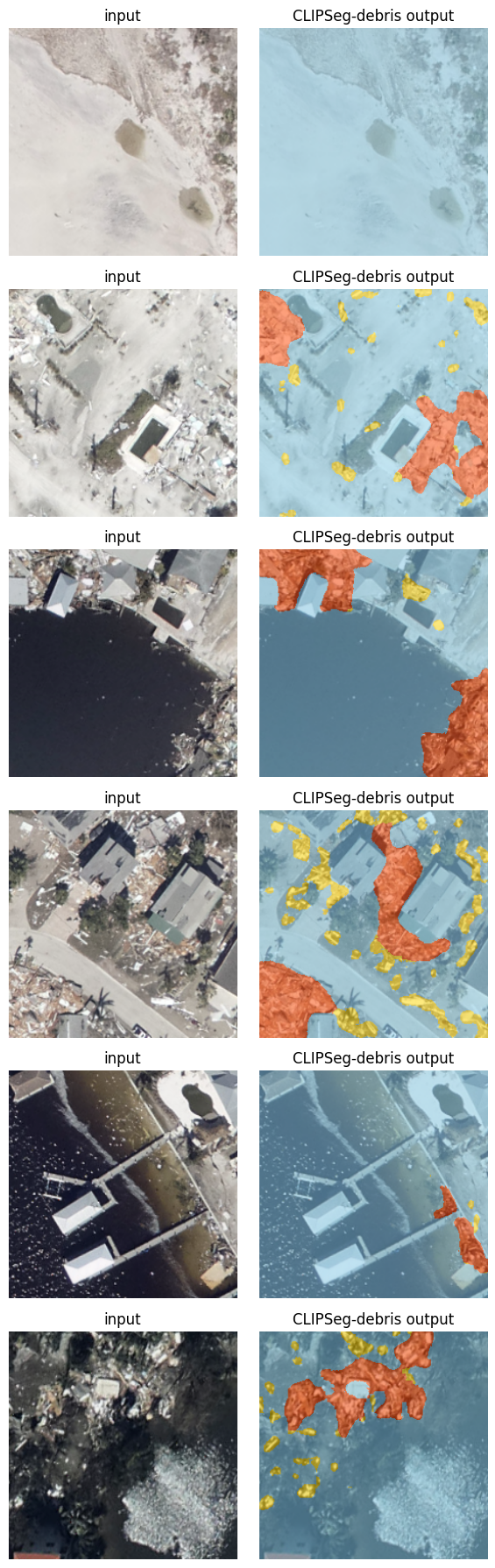
Predictions against hand-labelled masks#
For each image we show the input and the model’s debris overlay side by
side (these are the files evaluate() just wrote).
if ran_part1:
    import cv2
    pred_dir = EXPERIMENTS / "demo" / "predictions"
    orig_dir = EXPERIMENTS / "demo" / "original"
    pairs = sorted(zip(sorted(orig_dir.glob("*.png")), sorted(pred_dir.glob("*.png"))))[:6]
    fig, axes = plt.subplots(len(pairs), 2, figsize=(6, 3 * len(pairs)))
    for ax_row, (o, p) in zip(np.atleast_2d(axes), pairs):
        ax_row[0].imshow(cv2.cvtColor(cv2.imread(str(o)), cv2.COLOR_BGR2RGB))
        ax_row[0].set_title("input"); ax_row[0].axis("off")
        ax_row[1].imshow(cv2.cvtColor(cv2.imread(str(p)), cv2.COLOR_BGR2RGB))
        ax_row[1].set_title("CLIPSeg-debris output"); ax_row[1].axis("off")
    fig.tight_layout(); display(fig); plt.close(fig)
else:
    print("Run Part 1 above (needs the dataset via mount or DAPI) to see predictions.")
Part 2 — A regional example: Estero Island, FL#
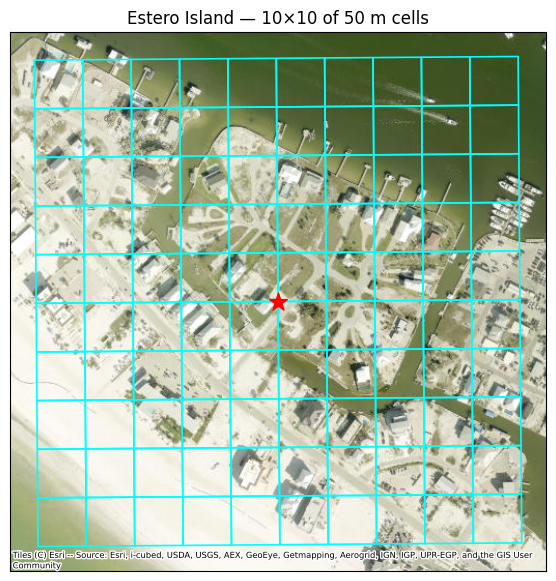
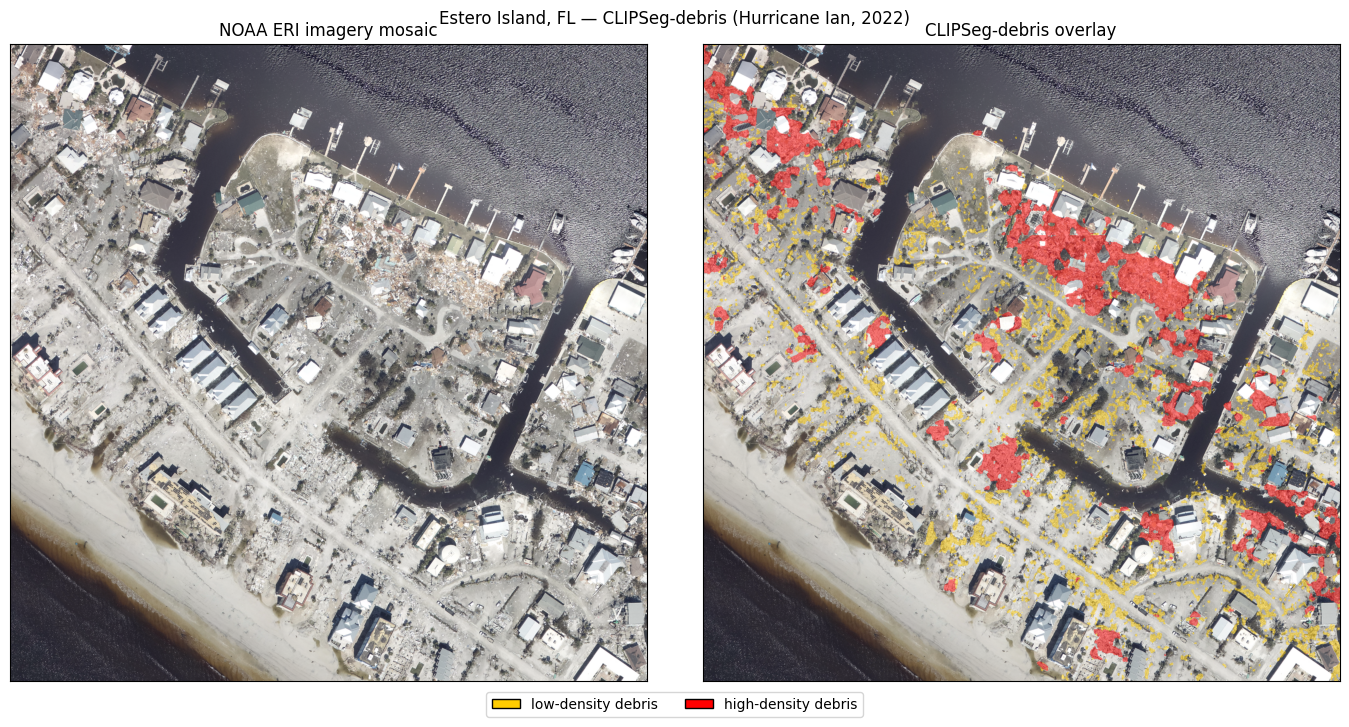
Now we go beyond single images to a region. We build a 10×10 block of 50 m
cells centered on (26.456753, -81.959124) — Fort Myers Beach / Estero Island,
the model’s training region — and pull the matching NOAA Emergency Response
Imagery for Hurricane Ian (2022).
You can browse the very same aerial imagery in NOAA’s interactive
storm viewer.
RegionalDebrisDemo (in utils/regional.py) wraps the same logic as the
production regional pipeline. In this step, we build the grid and view it over an
aerial basemap.
demo = regional.RegionalDebrisDemo(
    center_lat=26.456753, center_lon=-81.959124,
    n_cells=10, cell_size_m=50.0, target_pixels=256,
    workdir=str(EXPERIMENTS / "estero_regional"),
)
print(demo.describe())

grid = demo.build_grid()
ax = viz.show_grid_on_basemap(
    grid, center_lonlat=(demo.center_lat, demo.center_lon),
    title=f"Estero Island — {demo.n_cells}×{demo.n_cells} of {demo.cell_size_m:.0f} m cells")
display(ax.figure); plt.close(ax.figure)
RegionalDebrisDemo(center=(26.456753, -81.959124), 10x10 cells of 50 m -> 500 m square)
  CRS=EPSG:26917  bounds=(np.float64(404134.6), np.float64(2926374.5), np.float64(404634.6), np.float64(2926874.5))
  ERI source=20220930d_RGB
  workdir=/data/designsafe/mydata/kooshan1/nheri-training-ai-test/workshop_codes/experiments/estero_regional
NOAA ERI rasters for Hurricane Ian#
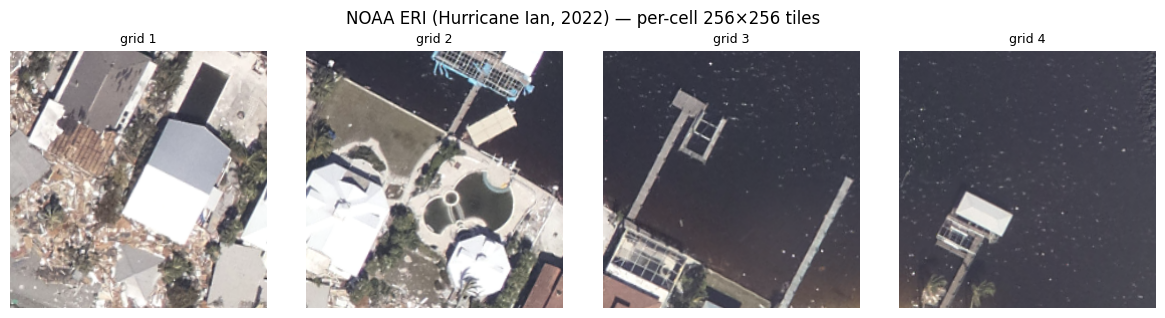
For every cell we fetch the corresponding NOAA ERI tile straight from NOAA’s public
S3 bucket (noaa-eri-pds on AWS Open Data)
using windowed reads (only the bytes overlapping each cell are downloaded),
reprojected/resampled to a 256×256 RGB GeoTIFF.
paths = demo.fetch_imagery(overwrite=False)

import rasterio
sample = sorted(paths.items())[:4]
fig, axes = plt.subplots(1, 4, figsize=(12, 3.2))
for ax, (gid, p) in zip(axes, sample):
    with rasterio.open(p) as s:
        ax.imshow(s.read([1, 2, 3]).transpose(1, 2, 0))
    ax.set_title(f"grid {gid}", fontsize=9); ax.axis("off")
fig.suptitle("NOAA ERI (Hurricane Ian, 2022) — per-cell 256×256 tiles")
fig.tight_layout(); display(fig); plt.close(fig)
[regional] tile index '20220930d_RGB': 1818 tiles (tile_index_20220930d_RGB.shp)
[regional] fetched 100 cells; 100 with >50% imagery coverage.
Cell-by-cell inference across the grid#
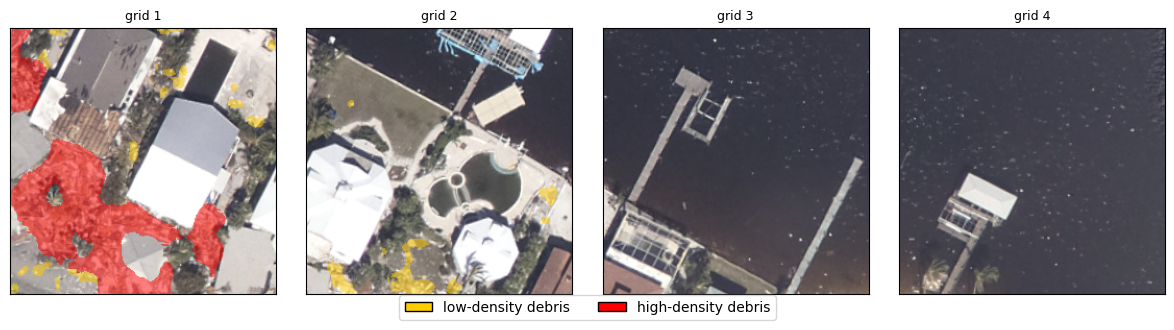
We load the official CLIPDensePredT from the repo we set up in Step 2 and run
it on the cells. predict_image() reproduces the repo’s predict_step (prompt
with "a photo of {density}" for the 3 densities, stack, forward, argmax).
We preview the model’s debris overlay on a few cells, then run the full 10×10 block (small and fast on a GPU session).
model = None
try:
    model = co.load_model(REPO, CKPT, device=co.get_device())
except Exception as e:
    print("Could not load the model here (needs torch + the repo deps):", e)

if model is not None:
    # preview the model on the same first 4 grid cells shown above
    gids = sorted(demo._imagery_paths)[:4]
    imgs = [dc.load_rgb(demo._imagery_paths[g]) for g in gids]
    masks = co.predict_images(model, imgs, progress=True)
    fig = viz.show_overlay_row(imgs, masks, titles=[f"grid {g}" for g in gids])
    display(fig); plt.close(fig)
[clipseg] official CLIPDensePredT loaded (150.8M params) from clipseg_debris_weight.ckpt; device=cuda
The assembled debris map for Estero Island#
We run the official model over all cells (writing georeferenced mask GeoTIFFs), mosaic the imagery and masks into regional rasters, and show the imagery alongside the CLIPSeg-debris overlay across the island.
if model is not None:
    demo.run_inference(model=model, write_masks=True, progress=True)   # all cells
    img_mosaic = demo.mosaic("imagery")
    mask_mosaic = demo.mosaic("mask")

    fig = viz.show_region_mosaic(
        img_mosaic, mask_mosaic,
        title="Estero Island, FL — CLIPSeg-debris (Hurricane Ian, 2022)")
    display(fig); plt.close(fig)
else:
    print("Load the model above to build the regional map.")
[regional] wrote imagery mosaic -> /data/designsafe/mydata/kooshan1/nheri-training-ai-test/workshop_codes/experiments/estero_regional/mosaic_imagery.tif
[regional] wrote mask mosaic -> /data/designsafe/mydata/kooshan1/nheri-training-ai-test/workshop_codes/experiments/estero_regional/mosaic_mask.tif
Part 3 — Scale out with a DAPI HPC GPU job#
A single island fits in the notebook session; a whole region (thousands of
cells) does not. For that we ship the work to a GPU HPC node with dapi. The
recipe:
Bundle a self-contained job: the inference driver + thin helpers + weights + the input tiles (
build_inference_bundle). The node clones the official repo.Upload it to DesignSafe storage (
upload_dir).Generate + submit a Tapis job on a GPU queue (
generate_inference_job,submit_and_monitor).Download the resulting georeferenced masks.
If you entered a TACC_ALLOCATION in Step 1b, this submits the job and downloads the
masks; otherwise it builds the bundle and stops (the in-session map above already
shows the result for Estero).
ALLOCATION = os.environ.get("TACC_ALLOCATION", "")
INFER_SYSTEM = os.environ.get("INFER_SYSTEM", "vista")
INFER_QUEUE = os.environ.get("INFER_QUEUE", "gh-dev")

if ds is not None and ALLOCATION:
    try:
        display(dh.gpu_queues(ds, INFER_SYSTEM))    # inspect queues/limits
    except Exception as e:
        print("queue lookup note:", e)

bundle = dh.build_inference_bundle(
    bundle_dir=EXPERIMENTS / "estero_regional" / "job_bundle",
    utils_dir=REPO_ROOT / "utils",
    job_dir=REPO_ROOT / "designsafe_job",
    weights_path=CKPT,
    input_tiles_dir=demo.imagery_dir,
)
Credentials already exist for user 'kooshan1' on system 'vista'. No action taken.
| name | hpcQueue | maxNodes | maxCoresPerNode | maxMinutes | maxMemoryMB | maxJobsPerUser | |
|---|---|---|---|---|---|---|---|
| 0 | gg | gg | 32 | 144 | 2880 | 237000 | 40 |
| 1 | gh | gh | 64 | 72 | 2880 | 96000 | 40 |
| 2 | gh-dev | gh-dev | 8 | 72 | 120 | 96000 | 3 |
[dapi] inference bundle ready at /data/designsafe/mydata/kooshan1/nheri-training-ai-test/workshop_codes/experiments/estero_regional/job_bundle (100 input tiles)
if ds is not None and ALLOCATION:
    remote = ds.files.to_uri("/MyData/clipseg_debris_demo/estero_infer")
    dh.upload_dir(ds, bundle, remote)
    req = dh.generate_inference_job(
        ds, input_dir_uri=remote, allocation=ALLOCATION,
        system=INFER_SYSTEM, queue=INFER_QUEUE,
        weights_filename=CKPT.name, max_minutes=30, job_name="clipseg-debris-estero")
    job = dh.submit_and_monitor(ds, req, timeout_minutes=30)
    # Find + download the mask GeoTIFFs from the archive (robust to where Tapis
    # nests outputs/, e.g. under inputDirectory/).
    got = dh.download_job_outputs(ds, job, demo.mask_dir, pattern="*-mask.tif", verbose=True)
    if got:
        print(f"\n{got} masks -> {demo.mask_dir}  (re-run Part 6 to mosaic them)")
    else:
        # Nothing matched: show what the job actually printed + the archive tree
        # so we can see whether inference ran and where the files landed.
        print("\nNo masks downloaded — showing the job's own log (tapisjob.out):")
        try:
            dh.show_job_logs(job, max_lines=60)
        except Exception as ex:
            print("   log unavailable:", ex)
        print("\nArchive tree (dirs + *-mask.tif):")
        dh.print_job_tree(ds, job, max_depth=4)
else:
    print("No TACC allocation set (Step 1b) — skipping submission. Bundle ready at:", bundle)
Translated '/MyData/clipseg_debris_demo/estero_infer' to 'tapis://designsafe.storage.default/kooshan1/clipseg_debris_demo/estero_infer' using t.username
[dapi] uploaded 105 file(s) -> tapis://designsafe.storage.default/kooshan1/clipseg_debris_demo/estero_infer
Translated '/MyData' to 'tapis://designsafe.storage.default/kooshan1' using t.username
[dapi] submitted 1ab852ba-21bf-49e7-a53b-01cbb3a8c78e-007 -> vista/gh-dev

Monitoring Job: 1ab852ba-21bf-49e7-a53b-01cbb3a8c78e-007
	Status: RUNNING
	Status: ARCHIVING
	Status: FINISHED
[dapi] status after monitor: FINISHED
[dapi] downloaded 100 file(s) matching '*-mask.tif' from inputDirectory/outputs/mask_tif -> /data/designsafe/mydata/kooshan1/nheri-training-ai-test/workshop_codes/experiments/estero_regional/masks

100 masks -> /data/designsafe/mydata/kooshan1/nheri-training-ai-test/workshop_codes/experiments/estero_regional/masks  (re-run Part 6 to mosaic them)
Part 4 — Fine-tune CLIPSeg-debris on Vista (TACC GH200) via DAPI#
DesignSafe gives us TACC’s newest AI system,
Vista — NVIDIA GH200
Grace-Hopper nodes. We launch the model’s official fine-tuning
(src/train.py experiment=clipseg_finetune) on a Vista GPU and track progress on
Weights & Biases (if you provided a key in Step 1b) or via DAPI.
Fine-tuning needs the labeled debris data. The published PRJ-6029 dataset has
everything (original/, annotations/, prompts_vis/{no,low,high}/) but in a
slightly different layout than the trainer’s DebrisOneHotDataset
(original/, segmentation_merged/, vis_prompts/...). So we prepare it
(convert annotations → one-hot, rename folders), verify it loads, then
bundle it with the job (Vista compute nodes don’t mount MyData).
Reshape PRJ-6029 into the official datamodule layout#
obtain_and_prepare fetches the published PRJ-6029 data on this session (via the
NHERI-Published mount, the TACC corral filesystem, or the DesignSafe files API),
converts it to the trainer’s DebrisOneHotDataset layout (annotations → 3-channel
one-hot, folder names), and writes it to MyData (shared with Vista). FT_LIMIT
subsamples for a quick demo. If the data can’t be reached here, it prints a short
diagnostic with next steps.
from utils import finetune_data as fd

PRJ6029_SUB = "Project--hurricane-induced-debris-segmentation-dataset-using-aerial-imagery--V2/data"
ALLOCATION    = os.environ.get("TACC_ALLOCATION", "")
WANDB_PROJECT = os.environ.get("WANDB_PROJECT", "clipseg-debris-finetune")
WANDB_ENTITY  = os.environ.get("WANDB_ENTITY", "")
VISTA_SYSTEM  = os.environ.get("VISTA_SYSTEM", "vista")
VISTA_QUEUE   = os.environ.get("VISTA_QUEUE", "gh-dev")
FT_LIMIT      = int(os.environ.get("FT_LIMIT", "120"))   # debris-positive images to use (0 = all)

prepared = (dh.mydata_dir() or EXPERIMENTS) / "clipseg_finetune_data"
if prepared.exists() and (prepared / "original").exists():
    print("Using previously prepared dataset:", prepared)
    os.environ["CLIPSEG_DATASET_DIR"] = str(prepared)
else:
    # Obtain on THIS session, trying in order: NHERI-Published mount ->
    # TACC corral filesystem -> DAPI publications download. Then convert.
    result = fd.obtain_and_prepare(
        ds, out_dir=prepared, prj="PRJ-6029",
        mount_dir=dh.published_mount("PRJ-6029", PRJ6029_SUB),
        limit=(FT_LIMIT or None))
    if result:
        os.environ["CLIPSEG_DATASET_DIR"] = str(result)

DATASET_DIR = os.environ.get("CLIPSEG_DATASET_DIR", "")
print("\nCLIPSEG_DATASET_DIR =", DATASET_DIR or "(not set)")
Using previously prepared dataset: /data/designsafe/mydata/kooshan1/clipseg_finetune_data

CLIPSEG_DATASET_DIR = /data/designsafe/mydata/kooshan1/clipseg_finetune_data
Verify the prepared dataset loads in the official datamodule (diagnostic)#
if DATASET_DIR and Path(DATASET_DIR).exists():
    fd.verify_finetune_dataset(REPO, DATASET_DIR, n=2)
else:
    print("No prepared dataset yet — see 7a.")
[finetune-data] DebrisOneHotDataset OK — 120 samples; sample ids ['000055', '000126', '000135', '000139', '000146']
  sample 0: image (3, 256, 256), target (1, 256, 256)
  sample 1: image (3, 256, 256), target (1, 256, 256)
Fine-tuning submitted to Vista via DAPI#
Bundle the prepared dataset with the job and submit it to the GH200 gh-dev queue,
then follow the job lifecycle via DAPI. If you enabled W&B in Step 1b, the run
also streams live curves there (the node authenticates via your ~/.netrc; the
key is never placed in the job). Requires a TACC allocation (Step 1b) and a prepared
dataset (7a).
train_job = None
USE_WANDB = os.environ.get("USE_WANDB", "0") == "1"
ready = (ds is not None and ALLOCATION and DATASET_DIR and Path(DATASET_DIR).exists())
if ready:
    try:
        display(dh.gpu_queues(ds, VISTA_SYSTEM))
    except Exception as e:
        print("vista queue note:", e)
    train_bundle = dh.build_training_bundle(
        bundle_dir=EXPERIMENTS / "train_bundle", job_dir=REPO_ROOT / "designsafe_job",
        dataset_dir=DATASET_DIR)                       # dataset travels with the job
    remote = ds.files.to_uri("/MyData/clipseg_debris_demo/train")
    dh.upload_dir(ds, train_bundle, remote)
    req = dh.generate_training_job(
        ds, input_dir_uri=remote, allocation=ALLOCATION, use_wandb=USE_WANDB,
        wandb_project=WANDB_PROJECT, wandb_entity=WANDB_ENTITY,
        system=VISTA_SYSTEM, queue=VISTA_QUEUE, max_minutes=110, max_epochs=10)  # <2h gh-dev cap
    train_job = dh.submit(ds, req)                     # non-blocking
    if USE_WANDB:
        print("Training queued on Vista — watch live curves on W&B (next cell).")
    else:
        print("Training queued on Vista (tracking via DAPI — no W&B configured).")
    print("Re-check status anytime with:  dh.job_status(ds, train_job)")
else:
    print("Not ready to submit. Need a TACC allocation (Step 1b) and a prepared")
    print("dataset (CLIPSEG_DATASET_DIR from 7a).")
Credentials already exist for user 'kooshan1' on system 'vista'. No action taken.
| name | hpcQueue | maxNodes | maxCoresPerNode | maxMinutes | maxMemoryMB | maxJobsPerUser | |
|---|---|---|---|---|---|---|---|
| 0 | gg | gg | 32 | 144 | 2880 | 237000 | 40 |
| 1 | gh | gh | 64 | 72 | 2880 | 96000 | 40 |
| 2 | gh-dev | gh-dev | 8 | 72 | 120 | 96000 | 3 |
[dapi] training bundle ready at /data/designsafe/mydata/kooshan1/nheri-training-ai-test/workshop_codes/experiments/train_bundle (480 dataset file(s) staged)
Translated '/MyData/clipseg_debris_demo/train' to 'tapis://designsafe.storage.default/kooshan1/clipseg_debris_demo/train' using t.username
[dapi] uploaded 481 file(s) -> tapis://designsafe.storage.default/kooshan1/clipseg_debris_demo/train
Translated '/MyData' to 'tapis://designsafe.storage.default/kooshan1' using t.username
[dapi] submitted 2dedaf2e-e93f-4737-a639-e07efd3ef62b-007 -> vista/gh-dev
[dapi] status: PENDING
Training queued on Vista — watch live curves on W&B (next cell).
Re-check status anytime with:  dh.job_status(ds, train_job)
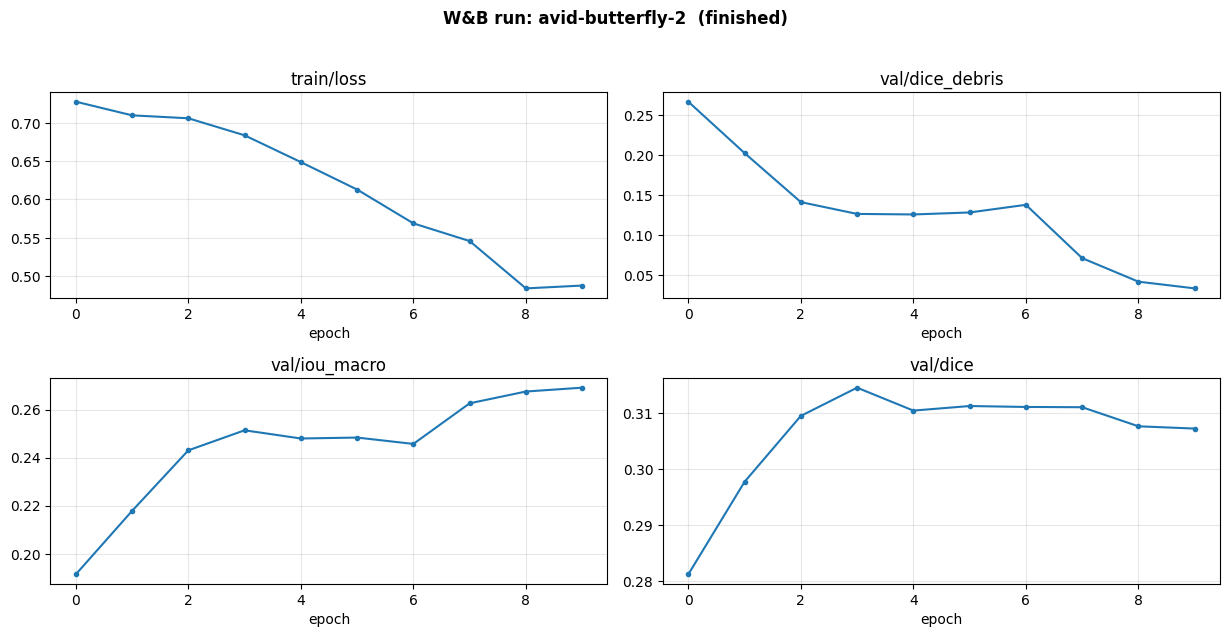
Progress streams to Weights & Biases or DAPI#
If you enabled W&B in Step 1b, this shows a
clickable link to the live dashboard plus the newest run’s loss / IoU / Dice curves
pulled inline via the W&B API
(re-run to refresh). wandb.ai can’t be embedded in a notebook iframe, so we use a
link + inline plots — set the project to public so others can open it without an
account. Without W&B, track the job through DAPI: its status and the per-epoch
metrics printed in the job log.
PUBLIC_WANDB_URL = os.environ.get("PUBLIC_WANDB_URL", "")
if PUBLIC_WANDB_URL:
    # Clickable dashboard link + inline metric curves from the W&B API (no iframe).
    dh.wandb_panel(PUBLIC_WANDB_URL,
                   entity=os.environ.get("WANDB_ENTITY", ""),
                   project=os.environ.get("WANDB_PROJECT", ""))
elif train_job is not None:
    # No W&B configured — track via DAPI: current status + where to read the metrics.
    dh.job_status(ds, train_job)
    print("\nPer-epoch metrics print in the job log:  dh.show_job_logs(train_job)")
else:
    print("No training job submitted yet — see 7c (needs a TACC allocation + dataset).")
newest run: avid-butterfly-2 -> https://wandb.ai/kooshan1/clipseg-debris-finetune/runs/9llr1vle
Exercises: change the prompt, the region, the grid#
Module 6 has no separate exercise notebook — blanking out the code of a production pipeline mostly just breaks it. The exercises are variations to make instead, in rough order of effort:
Change the prompt. CLIPSeg is text-prompted: the class names are an input, not a fixed head. Find where the prompts are set and try wording variants (“rubble”, “storm debris”, “damaged building material”). How much does the map move? This is the property that separates a foundation model from a fixed classifier, and it is worth feeling directly.
Change the region. Pass a different
ERISourcefromutils/regional.ERI_SOURCESwith a newcenter_lat/center_lon— another part of Estero Island, or a different hurricane entirely.Change the grid. Raise
n_cellsfrom the 10x10 block. Where does an in-session run stop being practical? That answer is why Part 3 exists.Read the failure cases. Find cells where the model is confidently wrong. Water, shadow, and bare roofs are the usual suspects. Connect this back to Module 3: what would you want a SHAP-style explanation of here, and why is attribution much harder for a segmentation model than for a decision tree?
With an allocation: run Part 3 end to end, then fine-tune in Part 4 and compare against the published weights on the same grid.
Adapting this to another region, storm or dataset#
Other regions / hurricanes: pass a different
ERISource(utils/regional.ERI_SOURCES) and a newcenter_lat/center_lon, or raisen_cellsto cover more ground.True regional scale: the Part 3 HPC pattern scales to thousands of cells.
Training: Part 4 runs the official
src/train.pyon Vista; adjust thedata=override indesignsafe_job/train_clipseg.shto your dataset layout.Where the pieces live: official model + inference in
utils/clipseg_official.py(no vendoring); grid + NOAA ERI inutils/regional.py; DesignSafe API + HPC/Vista jobs inutils/dapi_helpers.py; the job scripts indesignsafe_job/.
Citations#
If you use this work, please cite:
Paper — Amini et al., Debris segmentation using post-hurricane aerial imagery, Computer-Aided Civil and Infrastructure Engineering, 2025:
@article{https://doi.org/10.1111/mice.70033,
  author  = {Amini, Kooshan and Liu, Yuhao and Padgett, Jamie Ellen and Balakrishnan, Guha and Veeraraghavan, Ashok},
  title   = {Debris segmentation using post-hurricane aerial imagery},
  journal = {Computer-Aided Civil and Infrastructure Engineering},
  volume  = {40},
  number  = {25},
  pages   = {4116-4131},
  doi     = {https://doi.org/10.1111/mice.70033},
  url     = {https://onlinelibrary.wiley.com/doi/abs/10.1111/mice.70033},
  eprint  = {https://onlinelibrary.wiley.com/doi/pdf/10.1111/mice.70033},
  year    = {2025}
}
Dataset — Hurricane-Induced Debris Segmentation Dataset Using Aerial Imagery (DesignSafe PRJ-6029):
@misc{https://doi.org/10.17603/ds2-jvps-2n95,
  doi       = {10.17603/DS2-JVPS-2N95},
  url       = {https://www.designsafe-ci.org/data/browser/public/designsafe.storage.published/PRJ-6029/?version=2},
  author    = {Amini, Kooshan and Liu, Yuhao and Padgett, Jamie and Balakrishnan, Guha and Veeraraghavan, Ashok},
  keywords  = {hurricane, Debris, Segmentation, Aerial Imagery},
  language  = {en},
  title     = {Hurricane-Induced Debris Segmentation Dataset Using Aerial Imagery},
  publisher = {Designsafe-CI},
  year      = {2025},
  copyright = {Open Data Commons Attribution}
}
Software — CLIPSeg-debris model + code (DesignSafe PRJ-6225):
@misc{https://doi.org/10.17603/ds2-yt43-hw55,
  doi       = {10.17603/DS2-YT43-HW55},
  url       = {https://www.designsafe-ci.org/data/browser/public/designsafe.storage.published/PRJ-6225},
  author    = {Amini, Kooshan and Liu, Yuhao and Padgett, Jamie and Balakrishnan, Guha and Veeraraghavan, Ashok},
  keywords  = {Hurricane, Debris, Segmentation, Foundation Model},
  language  = {en},
  title     = {Debris Segmentation Model using Post-Hurricane Aerial Imagery (CLIPSeg-debris)},
  publisher = {Designsafe-CI},
  year      = {2025},
  copyright = {3-Clause BSD License}
}
Additional references: CLIPSeg (Lüddecke & Ecker, CVPR 2022); CLIP (Radford et al.,
2021); NOAA Emergency Response Imagery; TACC Vista; DesignSafe / dapi.