OpenSees on DesignSafe#
OpenSees was conceptualized, designed, and developed with parallel computing as a core objective. Parallel computing means leveraging multiple processors to work simultaneously — not only on independent tasks but also on tightly coupled problems where processors exchange information during execution.
From these design principles grew three major OpenSees applications (plus one Python interface), each optimized for different computational strategies and user needs:
OpenSees (Sequential / Single-Core)
The base Tcl interpreter. Best for testing models, debugging, or smaller problems.
OpenSeesSP (Shared Memory Parallel)
Runs on a single node using multiple processors.
Efficient for models that scale well with shared memory.
OpenSeesMP (Distributed Memory Parallel)
Runs across multiple nodes using MPI (message passing).
Best for very large simulations that require distributed computing power.
OpenSeesPy (Python Interface)
Provides a Pythonic interface to the OpenSees kernel.
Allows seamless integration with Python libraries (NumPy, SciPy, pandas, matplotlib, etc.), making it easier to script, postprocess, and automate workflows.
OpenSeesPy will soon be added to the DesignSafe Web Portal and Tapis Applications.
Through the Texas Advanced Computing Center (TACC), DesignSafe provides multiple platforms on which to run these OpenSees applications. Each platform emphasizes scalability and adaptability, allowing researchers to start small, expand to larger workloads, and choose the computational model best suited to their needs.
Your choice of OpenSees application and DesignSafe platform depends on the demands of your project — and those demands may shift as you move from prototyping to production-scale simulation. Importantly, “scaling up” is not just about adding more nodes. Some analyses require high memory per node, some are embarrassingly parallel, and others may benefit from GPU acceleration. DesignSafe’s integrated environment lets you move seamlessly among these options.
Submitting OpenSees Jobs on DesignSafe#
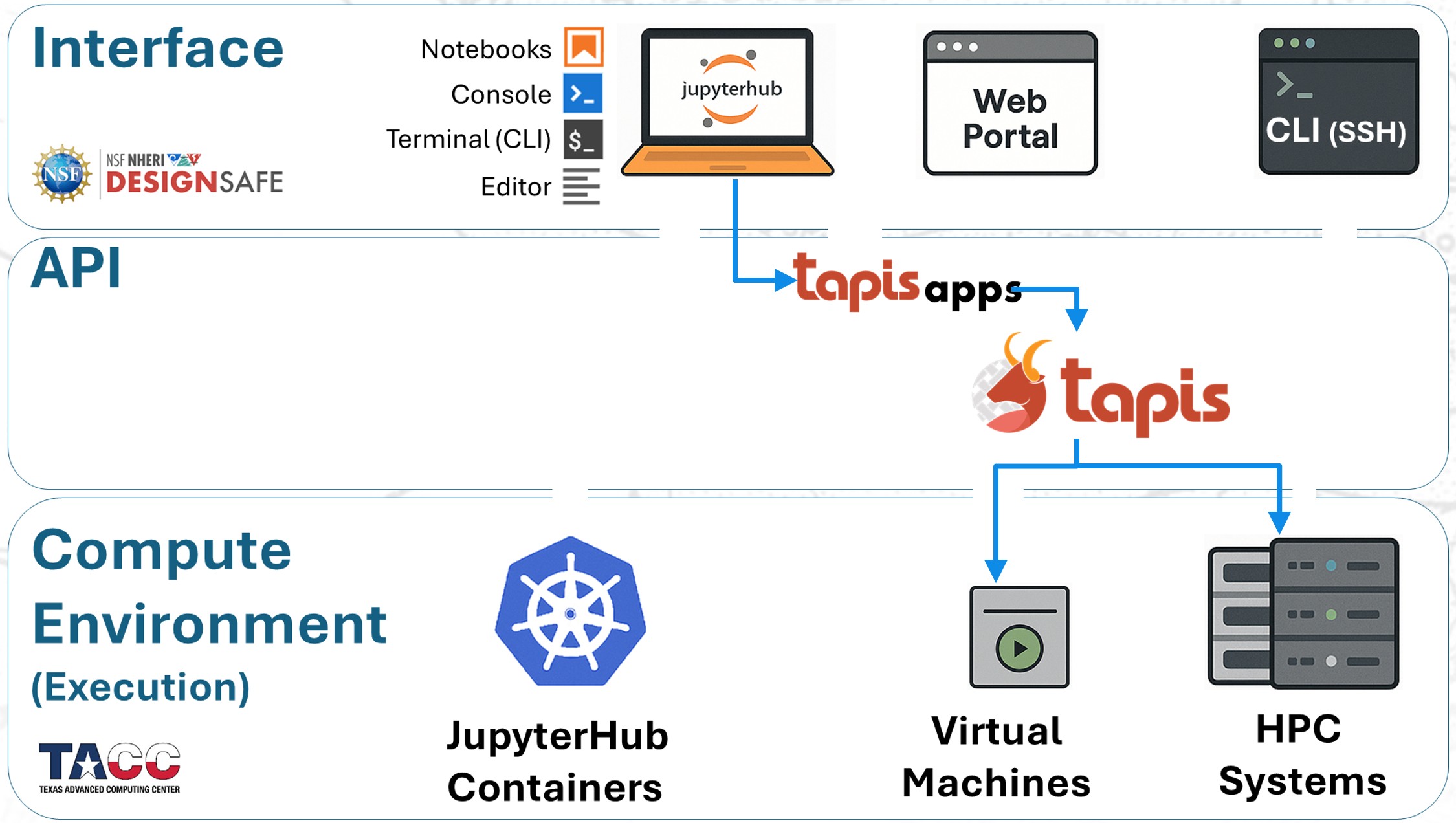
Now that we’ve explored the overall workflow architecture of DesignSafe (interfaces, middleware, and execution environments), let’s see how OpenSees fits into this picture.
Submitting an OpenSees job always involves the same three layers:
Interface — You choose how to interact (Web Portal, JupyterHub, or command line).
Middleware — The Tapis API stages files, creates SLURM jobs, and manages execution.
Execution Environment — The job runs in the chosen compute resource, from single-node containers/VMs to multi-node HPC systems like Stampede3.
In the next sections, we’ll walk through each access mode in detail, showing how you can submit OpenSees jobs, compare the strengths of each approach, and decide when to scale from quick tests to large-scale simulations.
Workflows for OpenSees on DesignSafe#
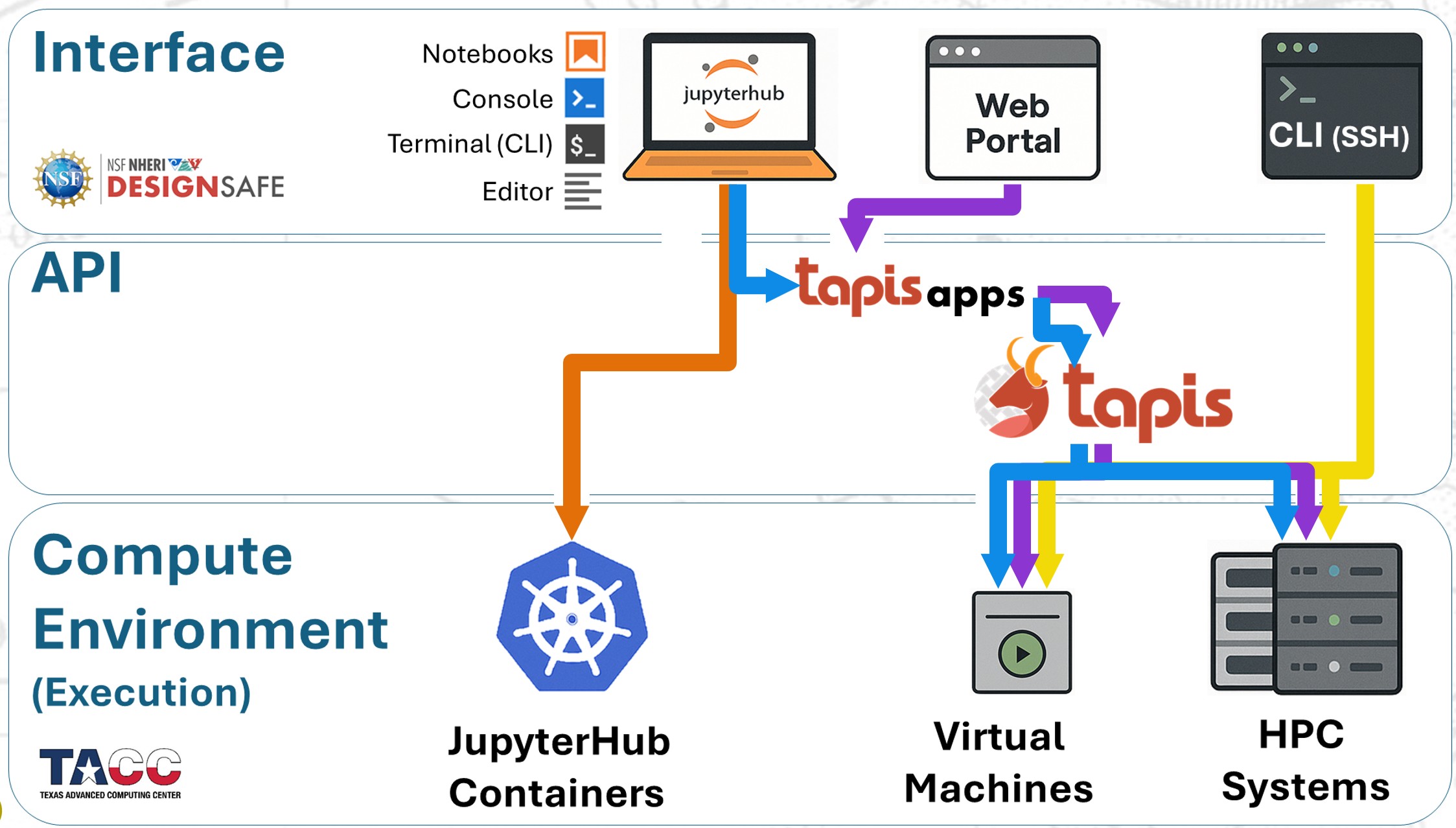
In practice, there are four main ways to run OpenSees on DesignSafe:
Web Portal (Tapis Apps): Submit preconfigured jobs directly to HPC.
JupyterHub (local run): Run OpenSees interactively inside a Jupyter container.
JupyterHub (HPC submission): Stage and launch jobs to HPC using Tapis Apps from your notebooks.
SSH (manual SLURM): Log into HPC systems and submit custom batch jobs.
The diagram below illustrates how these workflows map onto the DesignSafe architecture:
Recommendations#
Because each workflow has trade-offs, here are some practical guidelines:
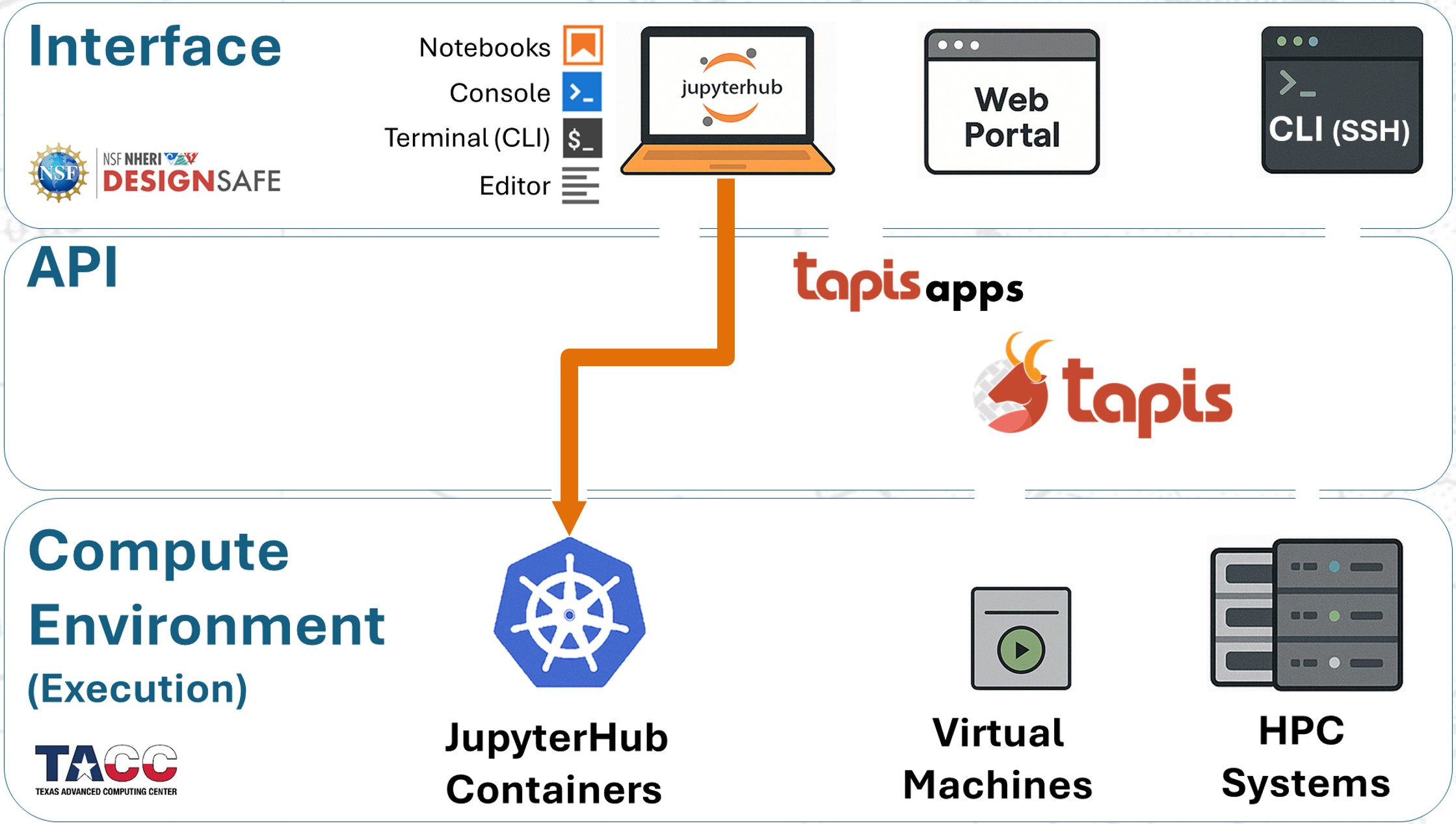
1. Run small to medium jobs within JupyterHub#
Fastest turnaround — no queue wait and no walltime limits.
Each container provides 8 processors.
2. Submit medium to large jobs to HPC from JupyterHub#
Recommended for heavier workloads.
Combines the convenience of Jupyter for file and script management with the scalability of HPC resources.