Computational Workflows#
DesignSafe’s cyberinfrastructure brings together the computational power of TACC with the ease of cloud-based interfaces, allowing researchers to move seamlessly between interactive exploration and large-scale, production-level computation. Whether you’re testing a small OpenSees model inside a Jupyter notebook or deploying thousands of simulations across Stampede3, DesignSafe’s ecosystem is built to scale with you — from one core to tens of thousands.
At its heart, DesignSafe is not just a collection of tools — it’s a workflow system designed to support the full life cycle of computational research:
developing models and scripts,
running and monitoring simulations,
managing input/output data, and
sharing or reproducing results.
Each of these stages may occur in a different computational environment, accessed through different interfaces, but connected by a common middleware layer that handles execution, authentication, and data transfer. This structure makes DesignSafe powerful, but it also means that understanding how jobs flow through the system is key to working efficiently and avoiding common pitfalls.
When you launch a job, several things happen behind the scenes: your code or application is packaged, transferred to a compute system, queued by a scheduler, executed across one or more nodes, and then results are retrieved and stored for postprocessing. Each of these steps occurs in a specific layer of the architecture — the execution environment, the interface environment, and the API layer that connects them.
Understanding these layers helps you:
choose the right tool for your task (interactive vs. batch, container vs. HPC),
optimize job performance and resource allocation,
build automated, portable workflows that scale from prototypes to production, and
troubleshoot or customize advanced workflows with confidence.
In this section, we’ll walk through the workflow architecture of DesignSafe and TACC — the backbone that ties together interactive computing, batch processing, and job automation.
Workflow Architecture#
Execution, Interface, and Automation
Understanding how jobs are submitted, where they run, and how you interact with the underlying systems is essential for building scalable, portable, and efficient workflows that make full use of DesignSafe’s and TACC’s capabilities.
Every computational job on DesignSafe follows a similar path: you interact with it through a user-facing interface, it runs in a compute environment, and these two sides communicate through an API layer that handles job submission, monitoring, and data movement.
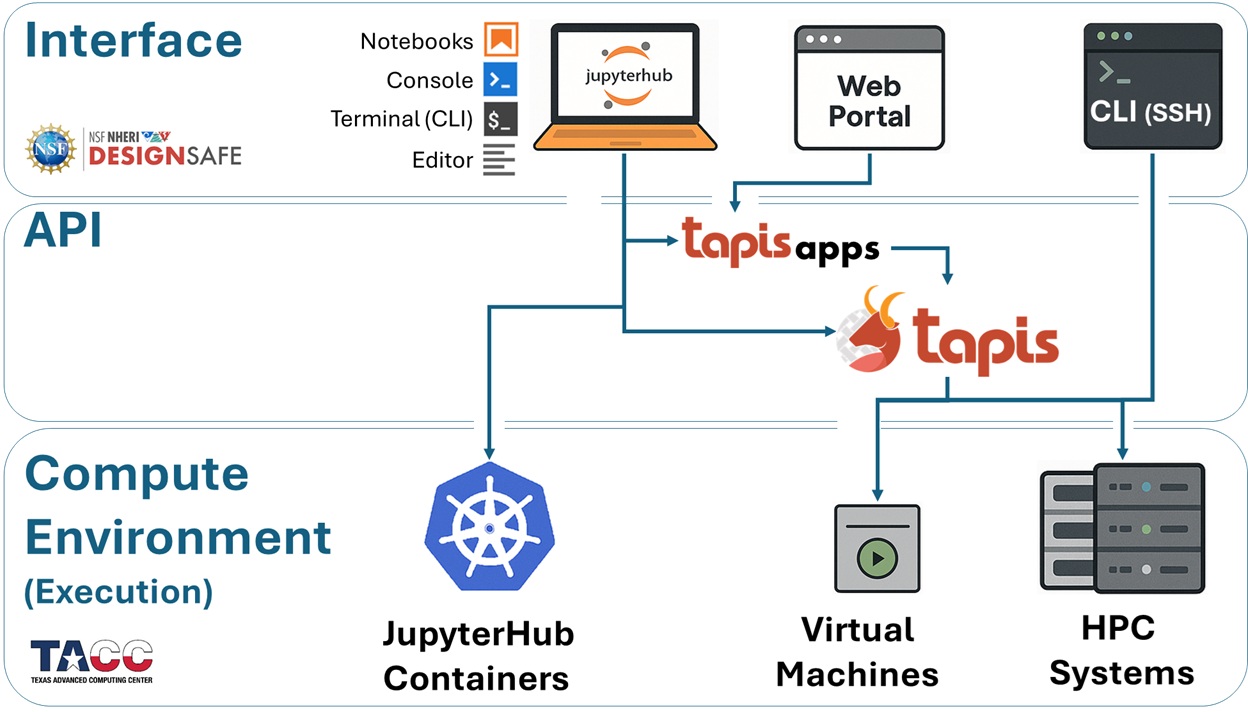
To make sense of this architecture, we divide it into three core layers — shown in the diagram below — that together define how your work travels through the system:
Execution Environments — Where your jobs are actually run
Interface Environments — How you access the execution environments, interact with DesignSafe, and prepare/submit/postprocess jobs
APIs — The middleware that connects your interfaces to the execution resources
These layers form a cohesive pipeline: you work at the interface level, Tapis handles orchestration, and your code executes on HPC hardware.
Execution Environments#
Where Your Jobs Run
Every job you launch on DesignSafe ultimately runs somewhere on TACC infrastructure. Depending on the size and style of your analysis, your job can land in one of three places:
JupyterHub Containers (Kubernetes Cluster) Great for prototyping, testing, or small-scale runs. You get an isolated container with up to 8 CPU cores and 20 GB RAM. This is limited to a single node, so it’s best for development work rather than production-scale simulations.
Virtual Machines (VMs) Targeted at lightweight or specialized workloads. Some VMs are configured only to receive jobs (e.g., OpenSees-EXPRESS, which accepts submit-only jobs through Tapis), while older interactive VMs have now been replaced by JupyterHub. Like containers, these are single-node.
HPC Systems at TACC For large simulations, your jobs scale up to supercomputers such as:
Stampede3 (general-purpose, multi-node)
Frontera, Vista, or Lonestar6 (specialized or experimental systems)
These require batch submission through the SLURM scheduler, but in exchange they unlock thousands of cores and huge memory pools.
Interface Environments#
How You Access the Compute Systems
Once you know where your job will run, the next step is deciding how you’ll interact with the system. DesignSafe gives you multiple access points, each with different levels of flexibility:
JupyterHub (Kubernetes) The most common starting point. A browser-based environment where you can write code, visualize data, and even launch HPC jobs directly through the Tapis API.
Web Portal The simplest option: point-and-click job submission. Preconfigured Tapis Apps (e.g., OpenSees, OpenSeesSP, OpenSeesMP) let you submit runs to Stampede3 without worrying about command-line syntax or schedulers. Ideal for new users or quick launches.
SSH (Terminal Login) For advanced control, you can log directly into TACC systems. Here you can edit files, manage storage, load modules, and submit custom SLURM jobs — the “raw” HPC experience.
Jupyter on HPC Nodes Less common, but useful if you need the full memory and cores of a single node. This launches JupyterLab directly on an HPC compute node, but it comes with queue wait times and is not recommended for large workflows.
Tapis API#
How Interfaces Submit Jobs to Execution Resources
Behind the scenes, every job launched from DesignSafe is carried into TACC’s systems by the Tapis API. Think of Tapis as the job courier and workflow manager:
It takes your inputs (from JupyterHub, Web Portal, or CLI)
Packages them into a SLURM batch job
Transfers files to the right place on Stampede3 or a VM
Submits, monitors, and retrieves results
You can interact with Tapis in three ways:
Indirectly — Every time you use the Web Portal or preconfigured Tapis Apps.
Semi-directly — Submitting jobs via the CLI or scripts inside Jupyter.
Directly — Calling the Tapis REST API or using Python libraries like
tapipyto build automated pipelines.
Tapis is what makes the system scalable and reproducible, whether you’re running one job today or thousands over the course of a project.
The following diagram gives you a snapshot of these components and how they contribute to the workflow we will be presenting in this training module.