
Tapis#
What is Tapis?
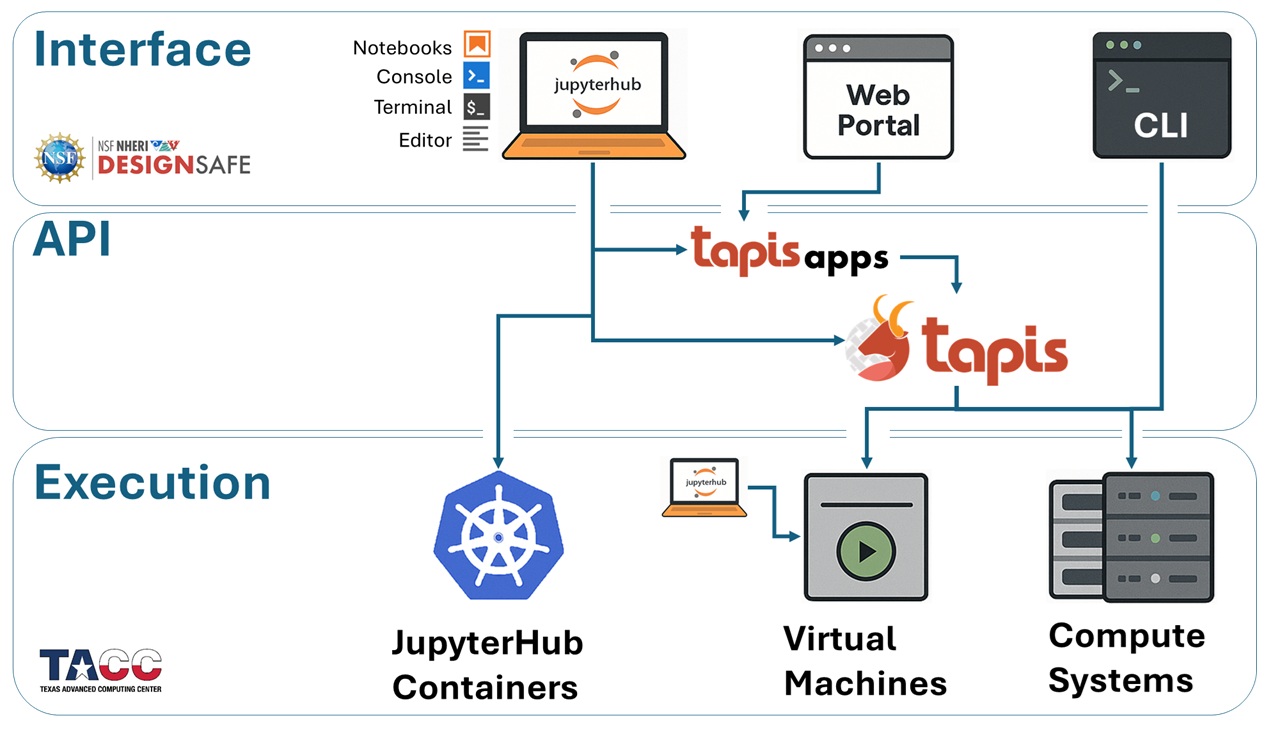
Tapis is a network-based API built on REST architecture, enabling users to manage computational jobs, data, and workflows across high-performance computing (HPC) and cloud systems — all through a consistent and secure interface.
API = Application Programming Interface — a programming layer that allows different software tools to talk to each other.
Networked API = APIs that communicate over a network (like the internet).
REST Architecture = “REpresentational State Transfer” — a common architectural style for web services that uses standard HTTP methods (GET, POST, PUT, DELETE).
Why Use Tapis?#
Tapis provides:
Seamless access to powerful compute systems, like those at TACC via DesignSafe
Tracking of your entire analysis pipeline, including inputs, outputs, app version, and parameters
Reproducibility, by saving job metadata and input references so you can rerun analyses exactly
Collaboration and sharing, allowing you to share files, apps, and jobs with team members — with access controls
No infrastructure to maintain — Tapis is hosted and maintained for you
What Are Tapis Applications?#
Tapis Apps are the foundation of the Tapis job workflow. They enable consistent, portable, and sharable execution of complex analyses across compute systems.
A Tapis App is a preconfigured, reusable execution template that defines:
The program or container to be run (e.g., OpenSees, OpenFOAM, custom scripts)
What inputs, parameters, and environment variables it expects
The execution system (like Stampede3) where the job should run
How the job should be launched (e.g., runtime settings, number of cores)
These apps allow you to submit jobs using consistent interfaces without worrying about job script formatting, environment setup, or scheduling details.
What Can Tapis Do?#
Tapis offers more than just job submission:
File Management Commands: Upload, download, move, copy, and list files on Tapis-enabled systems
Job Monitoring Functions: Track job status, duration, output logs, and exit codes
Job Metadata Queries: Retrieve full job history, input parameters, and archiving locations
Job Submission via Apps: Run your simulations or analyses by submitting jobs to a registered Tapis App
All of these capabilities can be accessed through:
Web interfaces, like the DesignSafe portal
Python code, using the
tapipySDK in Jupyter notebooksCommand Line (CLI) tools on JupyterHub or local terminals
Direct REST calls, using
curlor SimCenter tools
Tapis Workflow#
Most DesignSafe applications powered by Tapis follow this general pattern:
Authenticate with Tapis (get a token)
Upload files to a Tapis storage system (if needed)
Submit a job using a registered App and your input
Monitor job status (pending → running → finished)
Download or archive output data for further analysis